


Learning Chinese is no small feat. Between mastering characters, getting the tones right, and wrapping your head around grammar that works nothing like English, you'll want all the help you can get. Translation apps are great for quick lookups, but they won't help you actually retain what you're learning. That's where flashcards shine.
The trick is using the right ones. Some apps dump random vocabulary at you without context. Others focus so much on writing that speaking skills get neglected. If you're serious about making progress, you need flashcards designed around how your brain actually learns. Here are five worth your time.
- 5 Best Chinese Translation Apps For Learners [REVIEWED]
- 11 Best Apps To Learn Chinese [TESTED]
- 17 Best TV Shows to Learn Chinese in 2026

How To Use Chinese Flashcards
Flashcards work because they make you actively recall information instead of just recognizing it. The trick is using them consistently with spaced repetition—reviewing cards right before you're about to forget them. That's when your brain needs the reminder most, and it's what turns short-term memory into something that actually sticks.
Most flashcard apps handle the spacing automatically, so you just need to show up daily and do the work. Here's how to make flashcards actually work:
- Study daily, even if it's just 10 minutes to keep words fresh and build momentum
- Focus on both recognition and recall by practicing character-to-meaning and meaning-to-character
- Say words out loud while reviewing to practice pronunciation and lock in the tones
- Add personal context to cards when possible—sentences or scenarios that relate to your life stick better
- Don't skip the hard ones because those are exactly the cards your brain needs to wrestle with most
Must-Use Chinese Language Flashcards
Lingopie
Publisher: Lingopie
Availability: Android | iOS
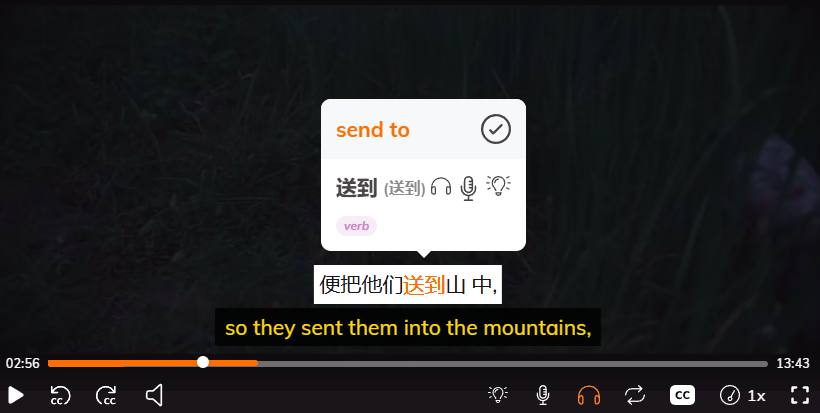
Lingopie takes a different approach to flashcards by building them directly from Chinese shows and movies. Instead of studying random vocabulary lists, you're watching actual content with interactive subtitles. When you come across a word you don't know, you click it, see the definition, and save it as a flashcard—all without leaving the video.
The Lingopie flashcards pull the exact audio clip and scene from the show, so when you review later, you're not just seeing the word in isolation. You're hearing it in context with native pronunciation and remembering the scene where it appeared. It's particularly effective for picking up conversational Chinese and getting comfortable with how people actually talk.
| Pros | Cons |
|---|---|
| Flashcards include audio and video context from real shows | Needs some foundation in Chinese to be useful |
| Learn vocabulary the way native speakers actually use it | Smaller content library compared to major streaming platforms |
| Makes studying feel less like work | Subscription required for full access |
| Great for picking up conversational phrases and slang | Not ideal if you prefer structured, textbook-style learning |
Laoshi
Publisher: Laoshi, Inc
Availability: Android | iOS
Laoshi is explicitly built for tackling Chinese accents, characters, and tones, two of the toughest parts of learning the language. The app uses spaced repetition to help you remember what you’re learning, and it’s loaded with pre-made word lists and flashcards from popular textbooks, thematic decks, and full HSK exam prep materials.
The standout feature is the handwriting practice—it shows you proper stroke order and lets you trace characters until they stick. There's also a tone training module that helps you recognize and produce tones accurately, which is huge if you struggle with hearing the difference between tones. The app works well if you're already studying from a textbook or preparing for the HSK, since you can sync your flashcards directly to what you're working on.
| Pros | Cons |
|---|---|
| Flashcards designed specifically for Chinese characters and tones | Deck settings feel restrictive and less flexible |
| Handwriting practice with proper stroke order | Can't easily remove known words from decks |
| Includes word lists from popular textbooks and all HSK levels | Limited customization for daily lesson limits |
| Tone training exercises help with pronunciation | Textbook lists can't be quickly added to lessons |
| Grammar database with 756 points for reference | Interface takes some time to learn |
Chinese Vocab: HSK Flashcard
Publisher: Better Learn Company
Availability: Android | iOS
Chinese Vocab takes a visual approach to flashcards by pairing each of its 5,000 vocabulary words with original artwork. The idea is you'll see an illustration that captures the word's meaning, tone, and context all in one image, making it easier to remember. The app uses spaced repetition to surface cards right before you forget them, and it includes daily challenges with streaks and XP to keep you motivated.
The visual element works well for people who learn better with images than text alone. Each card includes native audio, and you can flip to see context and usage. The gamified elements make studying feel less tedious, though some users mention that progress slows down without paying for the premium version.
| Pros | Cons |
|---|---|
| 5,000 original illustrations make words easier to remember | Free version limits how fast you can progress |
| Visual learning works well for image-based learners | Navigation to past lessons can be confusing |
| Gamified daily challenges with streaks and XP keep you engaged | Premium subscription needed for full features |
| AI tutor answers questions and provides examples on demand | Artwork style might not appeal to everyone |
| HSK-aligned vocabulary for structured test prep | Less focus on conversational or real-world context |
Todaii
Publisher: Mobile Learning
Availability: Android | iOS
Todaii takes a news-based approach to building vocabulary through news and flashcards. Instead of studying isolated words, you're reading actual Chinese news articles that range from beginner to advanced levels. Articles cover topics like entertainment, technology, economics, and food, and they're updated daily from reputable sources.
The best part is how seamlessly you can learn while reading—just tap any word in the article to see its definition, pinyin, and usage examples without leaving the page. You can toggle pinyin on or off depending on your level, and the app supports both simplified and traditional Chinese. There's also listening practice through videos and podcasts, plus over 170 HSK mock tests if you're preparing for exams.
| Pros | Cons |
|---|---|
| Learn vocabulary through real Chinese news articles | Frequent crashes, freezing, and lag issues |
| Tap any word for instant translation and examples | Articles sometimes fail to load correctly |
| Daily content updates across diverse topics | Intrusive ads in free version slow the app down |
| Includes 170+ HSK practice tests for exam prep | Technical problems make premium hard to justify |
| Toggle pinyin on/off and switch between simplified/traditional | Performance issues detract from the learning experience |
Reword
Publisher: POAS Apps
Availability: Android | iOS
ReWord keeps things simple with a straightforward flashcard system built around spaced repetition. The app includes 5,000 Chinese words and phrases organized by thematic categories and HSK levels 1-6, so you can focus on whatever topic or exam level you're working toward.
Each flashcard comes with a picture and an example sentence to help you understand how the word actually gets used. You can also create your own custom word lists if you want to prioritize specific vocabulary. The app works offline, which is handy if you're studying during a commute or traveling without internet.
The spaced repetition system is effective, but some users point out that the tones are occasionally wrong when the app reads words aloud. That's a problem if you're relying on it for pronunciation guidance and don't have prior experience to catch the mistakes.
| Pros | Cons |
|---|---|
| 5,000 words organized by theme and HSK levels | Tones are sometimes incorrect in audio |
| Spaced repetition keeps vocabulary retention high | No pinyin shown in vocabulary lists |
| Works offline for studying anywhere | Limited review mode flexibility |
| Clean, focused interface without distractions | Example sentences could be more contextual |
| Affordable one-time purchase option | Less useful for practicing character writing |
Learn Chinese With Lingopie
Look, flashcards are great for drilling vocabulary, but they won't teach you how people actually speak. That's the whole point of Lingopie. You're watching Chinese shows and movies, picking up words as they're actually used, and the flashcards you make pull the exact scene and audio from what you just watched. So when you review, you remember the context instead of just staring at isolated characters.
Honestly? It just feels less like work. You're watching stuff you'd enjoy anyway and learning at the same time. If drilling word lists is getting old, give it a shot.