

![11 Best Apps To Learn Chinese [TESTED]](/blog/content/images/size/w1200/2024/03/Spanish-1-6.png)
When I first started learning Chinese, I thought apps would be a fun supplement to "real" studying. You know, something to kill time on the train or make myself feel productive while procrastinating. Turns out, the right apps to learn Chinese can actually carry you pretty far. Well, that's if you pick the ones!
There are so many apps out there claiming to teach Mandarin Chinese, and most of them fall into one of two camps: either they’re just a dictionary with a fancy interface, or they’re so game-based that you end up chasing streaks instead of actually memorizing Chinese characters.
So, I spent months testing Chinese learning apps so you don’t have to. This post will go through what actually helped me build language skills, and what just made me feel busy without getting better.
- 5 Best Chinese Translation Apps For Learners
- 5 Chinese Accents That'll Change How You Hear Mandarin
- 60 Chinese Slang Words And Phrases From Xiaohongshu

Best Apps to Learn Chinese
When learning a language as hard as Mandarin Chinese, it’s important to note that consistency beats intensity every single time. You can’t cram Chinese characters the way you might’ve crammed for a Spanish vocab test in high school. This is why sticking to at least one Chinese language learning app is crucial, especially for beginners.
Apps give you that daily touchpoint with the language, even on days when you're too tired for a full study session. They track your progress, adapt to what you're struggling with, and they make it way easier to build a habit because you're not starting from scratch every time you open your laptop.
The best apps to learn Chinese don't just throw vocab at you; they create a structured learning process that gradually builds your reading skills, listening skills, and speaking practice without overwhelming you.
In this section, I'll walk you through the apps that actually helped me, which one works best for me, and the honest pros and cons I discovered while using them.
Lingopie
Availability: Android | iOS
Best For: Learning through immersive, real-world content
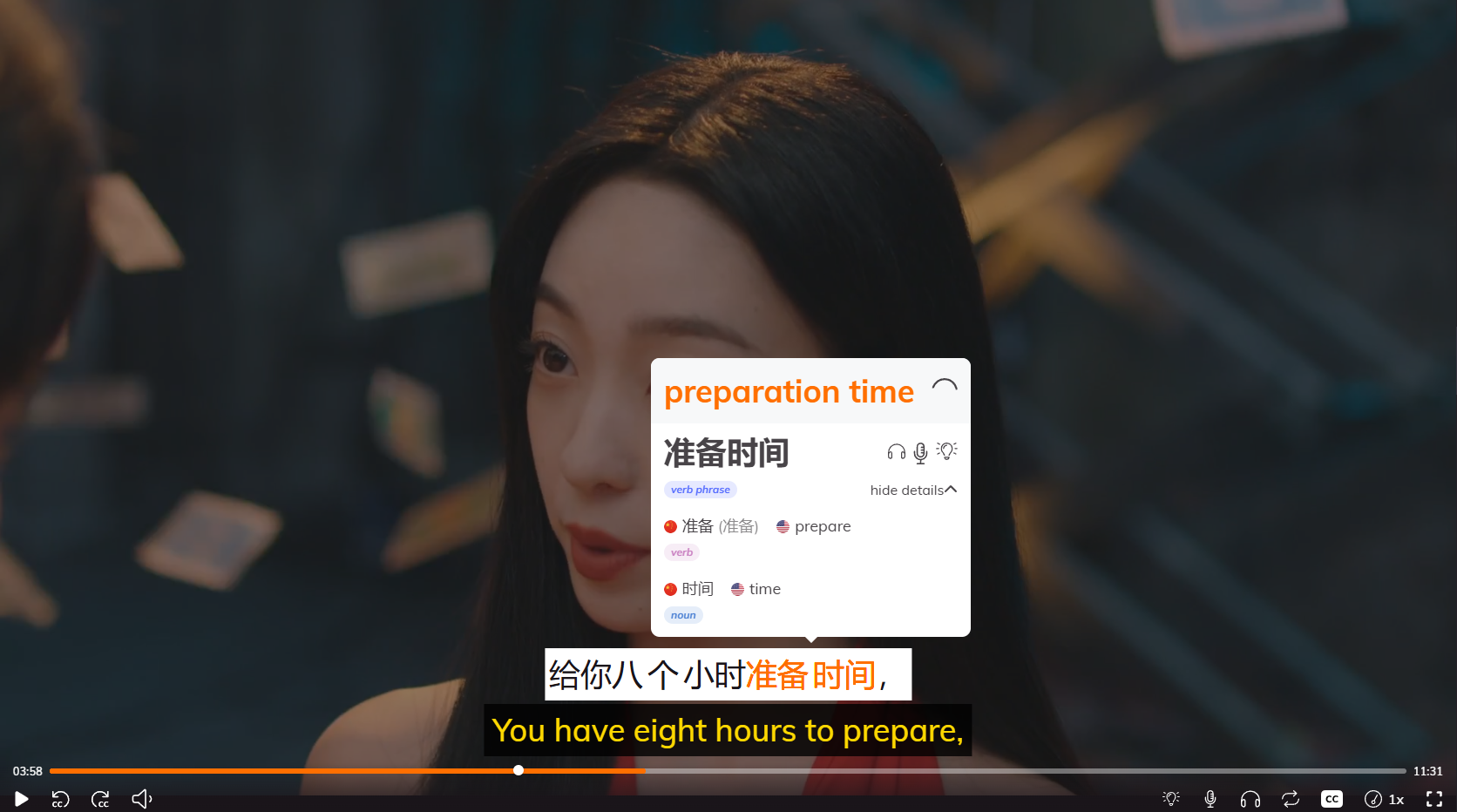
You don’t learn a language by memorizing flashcards. You learn by using it in context, the way native speakers actually talk. Lingopie gets this. Instead of drilling you on isolated vocabulary or forcing you through artificial lesson scripts, Lingopie teaches Chinese through real TV shows, movies, and music videos.
All you need to do is click on any word in the interactive subtitles, and boom, instant definition, pronunciation, and automatic flashcard. This approach is highly effective for developing listening skills and improving Chinese listening, as it immerses you in authentic spoken language.
The content library is legitimately good too—everything from dramas to cooking shows to music videos, so you’re not stuck watching boring educational content. A plus point is that it also exposes you to Chinese culture, given the niche nature of some of the shows within the catalog.
Lingopie's listening practice is similar to using YouTube videos for exposure to natural speech, providing a wide range of authentic audio for learners at different levels. And unlike most apps that trap you on your phone, Lingopie works on any Android device, including your TV, which is a game-changer for actually immersing yourself in the language.
Pros | Cons |
|---|---|
Learn through real Chinese TV shows, movies, and music—not artificial lessons | Requires intermediate listening skills to benefit fully (tough for complete beginners) |
Interactive subtitles let you click any word for instant definitions and pronunciation | Content library is smaller than Netflix (but growing) |
Adjust video speed, subtitle settings (pinyin/characters/English), and playback easily | Subscription required for full access (but worth it compared to competitors) |
Save Chinese words to review with built-in flashcards and quizzes | Some shows have regional accents or slang that can confuse learners |
Works on Android devices including your TV—immersive learning on a big screen | Not ideal for learning writing skills or grammar rules in isolation |
User-friendly interface that’s intuitive and easy to navigate | |
Diverse content keeps learning engaging (dramas, cooking shows, music videos) | |
Builds listening skills and natural sentence structure better than any app I’ve tried | |
Learning feels like entertainment, not work |
Lingopie is especially strong for developing listening skills, as it provides constant exposure to real spoken Chinese. Regular listening practice is essential for developing listening comprehension in Chinese, making Lingopie a valuable tool for anyone serious about improving their Chinese listening abilities.
Ling
Availability: Android | iOS
Best For: Supplemental practice when other options don't work
Ling caught my attention because it offers Chinese (among dozens of other languages), and on paper, it looks like a solid Duolingo alternative. The interface is clean, the lessons use native speakers for audio, and it promises structured learning for beginners.
What just bothered me a bit is that its free version is basically a demo. You get two lessons—barely enough to figure out if the app's teaching style works for you—before you hit a paywall. I found this frustrating because I couldn’t tell if Ling's approach would actually stick for me without committing to a subscription first.
When I did try the lessons, I noticed something odd: the content feels generic across languages. You'll learn phrases like "He is reading a Chinese book," which... sure, grammatically correct, but when am I actually going to say that? The lessons also jump around without much structure—random vocabulary here, a conversation exercise there—and the grammar explanations are pretty sparse.
That said, if you're desperate for a language that Duolingo doesn't cover and you're okay with a less polished experience, Ling might fill that gap. For Chinese specifically, though? There are better options that'll give you more structure and won't gate nearly everything behind a paywall.
Pros | Cons |
|---|---|
Native speaker audio across all lessons | Free version is essentially useless—only 2 lessons available |
Covers a huge range of languages (good if learning something obscure) | Lessons feel generic and repetitive across different languages |
Similar reward system to Duolingo (streaks, points, etc.) | Grammar and culture notes are sparse and unhelpful |
Clean, easy-to-navigate interface | Speaking and writing recognition is unreliable and often frustrating |
No AI-generated voices—all human recordings | Lessons lack structure; random vocab and sentences without clear progression |
Constant push to upgrade to premium after every lesson |
Chairman's Bao

Availability: Android | iOS
Best For: Reading practice at specific HSK levels
The Chairman's Bao (TCB) markets itself as a tool for reading practice, featuring articles written specifically for Chinese learners at various HSK levels. The idea is solid: you read real-ish content (news, culture pieces, stories) with built-in dictionary support and graded difficulty. In theory, this should be perfect for developing reading skills and picking up new words in context. In practice? It's a mess.
I tried the beginner level as someone who knew maybe 50 characters, and the first "lesson" threw a full essay at me in spoken Chinese with corresponding characters, then immediately quizzed me on around 100 of them. No explanation, no build-up—just "here's a wall of text, good luck."
Even if you're past the beginner stage, the HSK level curation is all over the place. Articles marked as HSK 2 will randomly include HSK 4 or 5 characters, which defeats the whole point of graded reading. If you're an intermediate learner desperate for reading practice and willing to tolerate a buggy, poorly designed interface, Chairman's Bao has plenty of content. But honestly? The experience is frustrating enough that I'd recommend finding better-curated reading resources elsewhere.
Pros | Cons |
|---|---|
Large library of articles across different topics | HSK levels are poorly curated—articles include way too many characters above the stated level |
Focuses specifically on reading practice with real-ish content | Beginner lessons are brutal and assume you already know 100+ characters |
Available in both Traditional and Simplified Chinese | App is extremely buggy—bookmarks don't save, articles load incorrectly |
Built-in dictionary for looking up unfamiliar characters | Dictionary definitions are often wrong or completely useless |
Progress doesn't sync between mobile app and desktop site | |
Audio playback button (ear icon) doesn't work | |
Interface is clunky and requires multiple clicks for basic functions | |
Feels like it was designed by people with no teaching experience |
Du Chinese

Availability: Android | iOS
Best For: Contextual reading with tap-to-translate
Du Chinese is a great tool to learn Mandarin Chinese through contextual reading. The concept is that you’ll read short stories and articles at your level, tap on words you don’t know for instant definitions, and toggle pinyin on or off depending on how much support you need.
For intermediate learners, especially, this type of content can be incredibly helpful in picking up new vocabulary and becoming comfortable with sentence structure. Du Chinese even offers reading material marked by difficulty, ranging from newbie to master, and is categorized by HSK levels 1 to 6+.
But here’s the catch: the free version is basically a teaser.
You get a handful of stories, and then nearly everything else is locked behind a paywall. The premium subscription isn’t cheap either, which makes it hard to justify when AI can generate custom reading passages tailored to your exact level for free. I also noticed the voices sound AI-generated rather than native speakers, which is a letdown when you’re trying to develop listening skills alongside reading.
I think Du Chinese is good at what it does, but the steep price and limited free content make it hard to recommend when there are better-value options out there.
Pros | Cons |
|---|---|
Slick, polished interface that’s easy to navigate | Free version has very limited content—most stories are paywalled |
Stories and articles tailored to different proficiency levels | Premium subscription is expensive for what you get |
Pinyin toggle lets you control how much reading support you need | Voices sound AI-generated, not native speakers |
Tap-to-translate feature makes looking up words seamless | No flashcard system for individual words—only sentences |
Good variety of content (news, culture, fiction) for intermediate learners | Throws you into stories without scaffolding—hard for beginners |
Modern AI tools (like ChatGPT) can generate similar reading practice for free |
Duolingo
Availability: Android | iOS
Best For: Building basic vocabulary and daily habits
Look, Duolingo is probably the first app anyone thinks of when they hear "language learning apps," and for good reason. The gamification angle is good with all its streaks, points, leaderboards, and cute mascot guilt-tripping you into practicing daily. The lessons are bite-sized, the interface is intuitive, and it does a decent job of introducing Chinese characters. So for absolute beginners who need structure and motivation, Duolingo delivers on that front.
However, the constant monetization pressure is exhausting. The app used to have a lives system (lose five times, and you're done for a while), which was annoying but manageable. Now it's an "energy" system where every single question drains your energy bar, meaning you can barely get through a couple of lessons before you're locked out unless you pay for Super Duolingo or watch ads.
For a free app, I could tolerate some of this, but Duolingo has become so aggressive about pushing subscriptions.
Pros | Cons |
|---|---|
Extremely beginner-friendly with gradual introduction to Chinese characters | Aggressive monetization—constant ads and subscription prompts |
Gamification (streaks, points, leaderboards) keeps you motivated | Energy system makes it nearly impossible to practice without paying |
Bite-sized lessons that fit into a busy schedule | Speech recognition cuts you off mid-sentence and marks correct answers wrong |
Solid for building basic vocabulary and sentence structure | Free version is heavily limited and frustrating to use |
Intuitive, easy-to-navigate interface | Feels designed to annoy you into subscribing rather than genuinely help learning |
Available on every platform (mobile, desktop, web) | Not ideal for intermediate or advanced learners—lessons plateau quickly |
HelloChinese
Availability: Android | iOS
Best For: Structured lessons with active speaking practice

Hello Chinese quickly became one of my favorite apps for learning Mandarin Chinese, especially as a beginner. It comes with organized lessons that go deeper with explanations and give you more context for why things work the way they do in Chinese. It also has an intuitive handwriting interface, which is excellent for learning Chinese characters from scratch.
The free version is surprisingly generous. You get access to a solid chunk of structured lessons without hitting a paywall immediately, which gives you enough time to figure out if the app's teaching style works for you. If you do decide to upgrade, the Premium plan unlocks mini-games that reinforce what you've learned, and the Premium+ plan includes podcast-style content with additional exercises.
Pros | Cons |
|---|---|
Well-structured lessons that build on each other logically | Premium features (mini-games, podcast content) require subscription |
Detailed grammar explanations that actually help you understand Chinese | Interface isn't as flashy or gamified as Duolingo—might feel dry to some |
Lots of speaking exercises that force active language production | Free version is generous but still limited compared to paid plans |
Free version offers substantial content before hitting paywall | Not ideal for advanced learners—content plateaus at intermediate level |
Premium mini-games make drilling vocab and tones less tedious | |
Premium+ podcast-style content helps develop listening skills naturally | |
Feels designed by people who actually understand language learning |
Memrise
Availability: Android | iOS
Best For: Vocabulary retention through spaced repetition
I have a complicated history with Memrise. A few years ago, this was the app I recommended to everyone learning Chinese. The spaced repetition system actually worked, and the best part was the video clips. Seeing someone order food or react to something surprising while using a word I just learned made it stick. The user-generated content was a goldmine too. You could find decks for anything: HSK vocab, slang from Chinese dramas, even niche stuff like business terminology.
Then Memrise decided to "improve" things, and it's been a slow decline ever since. Essential vocabulary that used to be free? Paywalled. The app that used to run smoothly? Now it freezes mid-lesson like it's buffering on a 2005 internet connection. They added AI conversation practice that sounds like a corporate training video. The community-made decks are also gone!
If you can tolerate the glitches and don't mind paying for basic features, there's still value here. But honestly, my patience is wearing thin.
Pros | Cons |
|---|---|
Spaced repetition system is effective when it works | Essential vocabulary now locked behind paywall |
Video clips of native speakers using words in real contexts (still the best feature) | App constantly freezes—ruins the flow of learning |
User-generated decks cover niche vocabulary you won't find elsewhere | "Quick review" feature gives you more words than promised |
Good for drilling specific word lists (HSK levels, drama vocab, etc.) | Interface gets overhauled every 6 months, progress gets lost or reorganized |
AI conversation practice is stiff and ignores your actual responses | |
Went from one of the best to increasingly frustrating and unreliabl |
Skritter

Availability: Android | iOS
Best For: Learning proper character stroke order and writing
Skritter does one thing obsessively well: teaching you to write Chinese characters by hand. It simply forces you to write each stroke in the correct order actively, and if you mess up, it immediately shows you where you went wrong. For building genuine writing skills and muscle memory, this approach is unbeatable. I noticed my character retention improved dramatically after a few weeks because I was actually doing something with the characters instead of passively reviewing them.
The app also lets you choose between traditional or simplified Chinese characters and bopomofo or pinyin, which is great for flexibility. You can work through pre-made vocabulary lists (HSK levels, textbook decks) or create custom lists to follow along with whatever learning method you're using.
The price, though? It's steep. Like, genuinely expensive compared to most language learning apps. The weird thing is, the high price actually kept me motivated like I felt like I had to use it every day because I was paying so much. Skritter also takes some getting used to, but if you're serious about learning to write Chinese characters properly, it absolutely works.
Pros | Cons |
|---|---|
Best app for actually learning to write Chinese characters by hand | Expensive—significantly pricier than most language learning apps |
Forces correct stroke order and immediately corrects mistakes | App can be slow and buggy (syncing issues, lag) |
Choose between traditional/simplified characters and bopomofo/pinyin | Takes time to get used to the interface and workflow |
Pre-made vocab lists (HSK, textbooks) or create custom decks easily | Modifications (like mnemonic entries) sometimes don't sync properly |
Builds real muscle memory and character retention | High price is motivating... but also just high |
Customer support is responsive and fixes bugs efficiently | Not great for speaking or listening—purely focused on writing |
Works for learners following any method (textbooks, self-study, etc.) |
Rocket Chinese
Availability: Android | iOS
Best For: Audio-based conversational skills and grammar
Rocket Chinese feels less like an app and more like an audio course that happens to have an app attached. The core of the program is conversational audio lessons with full dialogues between native speakers that actually explain why sentences work the way they do. For me, this was huge. I've always struggled with understanding grammar rules in Chinese (why does 了 go here but not there?), and Rocket Chinese explains it well.
However, Rocket Chinese is expensive. Like, seriously expensive for what amounts to a few dozen audio lessons. The one-time payment feels steep, especially when you realize you could probably find similar content online for free or much cheaper. If money isn’t an issue and you prefer structured audio lessons over gamified apps, Rocket Chinese delivers quality content. But for most people, the price-to-value ratio doesn’t quite add up.
Pros | Cons |
|---|---|
Audio lessons feel like real conversations, not isolated phrases | Very expensive—one-time payment for limited content |
Explains why grammar works the way it does (huge for understanding) | Voice recognition is inconsistent (60%-100% accuracy) |
Reinforcement tools (flashcards, writing, listening) actually help retention | Some audio pronunciation sounds incorrect or poorly recorded |
Practical, usable phrases you can apply immediately | App interface is just okay—not beginner-friendly |
Faster learning curve than apps like Duolingo (less missing info) | Price doesn't justify the amount of content you get |
Good for learners who prefer structured audio courses | Could find similar audio lessons online for free or much cheaper |
StudyCat Chinese

Availability: Android | iOS
Best For: Teaching young kids basic vocabulary through games
StudyCat is designed specifically for young kids trying to learn Mandarin. The app is colorful, game-based, and engaging enough that my friend's 3-year-old actually asks to play it. The games cover basic Chinese vocabulary and include pronunciation practice that genuinely helps kids pick up tones, which is notoriously hard to teach.
But while it's undoubtedly entertaining, do note that you'll blow through all the content shockingly fast. One parent said their kid completed everything in a few days. Another mentioned their child knew all the words within a few months of a one-year subscription, and then... that's it. No new content, no refreshed challenges.
If you have a young child just starting with Chinese and you catch StudyCat on sale, it's a fun, effective tool for a few months.
Pros | Cons |
|---|---|
Adorable, engaging interface that kids actually want to use | $100 yearly subscription for shockingly limited content |
Game-based learning keeps young children interested and motivated | Most kids complete all lessons in days or a few months |
Helps kids pick up tones and pronunciation effectively | No new content or refreshed challenges after you finish |
Covers basic vocabulary (animals, colors, numbers, food) well | Needs more words, verbs, phrases, and variety to justify the price |
Parents report faster learning compared to traditional methods | Some games are too hard for very young kids (inconsistent difficulty) |
Feels like a scam when you realize how quickly you exhaust the content |
HeyChina
Availability: Android | iOS
Best For: Comprehensive skill-building (reading, writing, listening)
HeyChina positions itself as the all-in-one beginner-friendly app, and it actually lives up to that for the most part. It starts you with pinyin, builds up essential vocabulary, and throws in AI-powered conversation practice that feels more natural than some of the other apps I tested. The variety is solid too (like HSK test prep, writing practice for hanzi, listening exercises, games), so you're not just drilling vocab in a vacuum.
One thing I find weird, though, is that the repetition isn't enough for total beginners. The app moves through concepts a bit too quickly, and I found myself wishing I could drill things a few more times before moving on. The speech recognition also struggles with short sounds.
Pros | Cons |
|---|---|
All-in-one app with variety: HSK prep, writing, listening, games | Not enough repetition for beginners—moves through concepts too fast |
AI-powered conversation practice feels more natural than competitors | Speech recognition struggles with short sounds (tones on numbers, etc.) |
Lets you learn at your own pace (no forced streaks or energy systems) | Radical exercises mark correct answers as wrong if you're not subscribed |
Good for building essential vocabulary and pinyin foundation | Should lock content instead of giving false negatives—bad teaching method |
Engaging interface that keeps learning fun | Radical section issue undermines the app's integrity |
Works well for beginners starting from zero |
Pleco

Availability: Android | iOS
Best For: Quick word lookups and character reference
Pleco isn't really a language learning app. It's a dictionary. But it's the dictionary for Chinese learners, and honestly, I use it more than any actual learning app. The free version alone is ridiculously comprehensive—you can search by pinyin, handwriting, or English, and it gives you stroke order, individual character meanings, and sample sentences. It works offline, which is a lifesaver when you're traveling or don't have reliable internet.
I eventually bought the Basic Pack (around $30-ish depending on add-ons), and yeah, 100000% worth it. The paid version unlocks features like better example sentences, more dictionaries, and advanced search options that make looking up obscure grammar patterns way easier. There's even a flashcard system if you want to quiz yourself on saved words, though I mostly use Pleco for quick lookups rather than active study.
My only real complaint is the live OCR (optical character recognition)—you can point your camera at Chinese text, and it'll translate it, but sometimes it doesn't capture the characters properly, especially if the text is small or the lighting is bad. That said, even when OCR fails, you can just handwrite the character and get instant results.
Pros | Cons |
|---|---|
Best Chinese dictionary app, bar none | Not a learning app—just a dictionary (no lessons or structured content) |
Free version is incredibly comprehensive and useful | Live OCR doesn't always capture characters properly (lighting/size issues) |
Works offline—essential for travel or spotty internet | Paid add-ons can add up if you want all the features |
Search by pinyin, handwriting, or English—super flexible | Interface is functional but not flashy (might feel dated to some) |
Shows stroke order, character meanings, and example sentences | Flashcard system exists but isn't as polished as dedicated SRS apps |
Fast, clean interface that doesn't waste your time | |
Basic Pack ($30-ish) unlocks advanced features and is worth every penny | |
Every serious Chinese learner uses this—it's an essential tool |
Choosing the Right App for You
Look, I’ve spent way too much time bouncing between apps, drilling flashcards, and forcing myself through lessons that felt more like homework than actual learning. And you know what? My Chinese barely improved until I started using it in context—watching real people have real conversations about things that actually matter.
That’s why Lingopie changed everything for me. Instead of treating Chinese like a subject to study, it lets you learn the way kids naturally pick up language: through stories, emotions, and context.
So if you’re tired of mainstream apps or if you’ve plateaued with traditional methods and need something that actually sticks, just try Lingopie. You can start with their free trial, pick a show that looks interesting, and see if learning through real content works for you the way it worked for me.
Try Lingopie today to see why many language learners are choosing this for foreign language learning!



![6 Best German Translator Apps For Beginners [TESTED]](/blog/content/images/size/w1200/2026/01/Best-german-translation-apps-for-beginners-.jpeg)