
According to a UCLA study, approximately 77.8% of college students use flashcards for studying. The other 22.2%? Well, they’re probably failing. The truth is, flashcards are one of the oldest study tools for a reason. They force your brain to actively recall information instead of passively reading it.
For language learners, this means that using digital or printable German flashcards can actually help you remember German vocabulary faster than staring at a textbook.
The good news? There are dozens of German flashcard apps available today. The bad news? Most of them are terrible. Boring word lists. Robotic pronunciation. That depressing "studying for a test" feeling. I downloaded 20+ apps and wanted to throw my phone out the window. But I found 7 that don't make you want to quit German forever.
- 6 Best German Translator Apps For Beginners [TESTED]
- How Long Does It Take To Learn German? [2026 Guide]
- How To Say Thank You In German? 18 Natural Ways
7 Best German Flashcard Apps Worth Using
German is a powerful language, but it’s not an easy one to memorize. With three genders, long compound words, and sentence structures that move verbs to unexpected places, your brain needs constant exposure to new vocabulary in order to keep up. That’s why flashcards are so effective for German learners.
I firmly believe that the right flashcard app can make the difference between constantly forgetting and actually building confidence, which is why I’ve rounded up the most useful German flashcard apps below.
Lingopie Flashcards
Available On: Android | iOS
Best For: Learning German vocabulary from real TV shows and movies
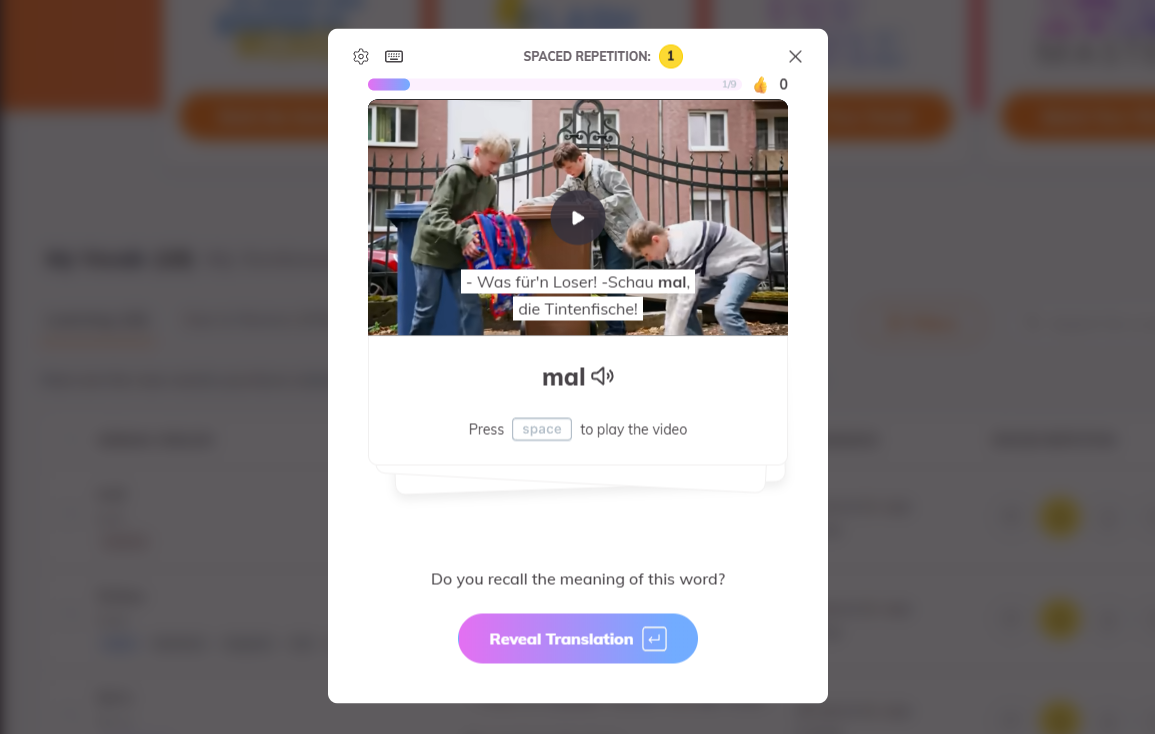
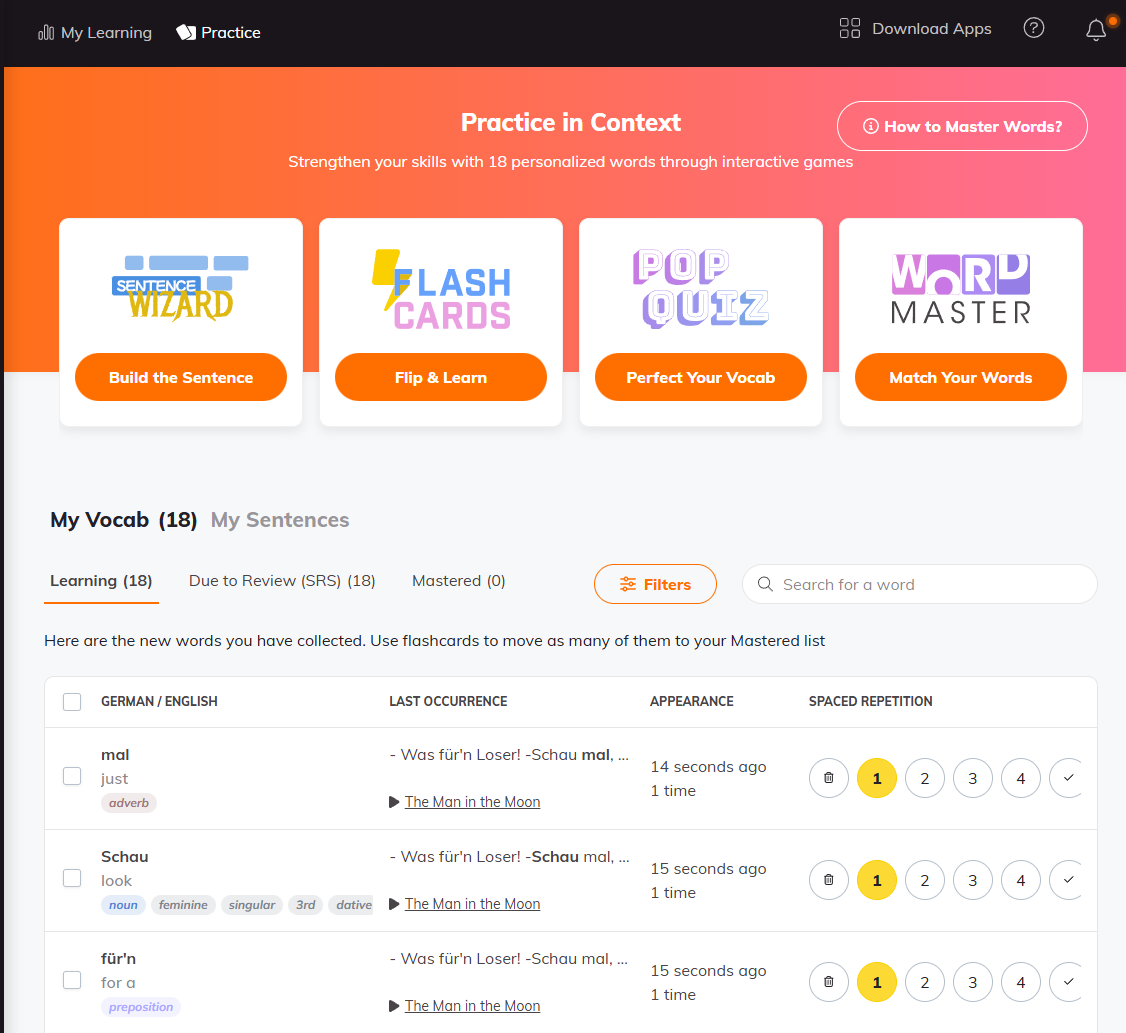
Lingopie is an immersive language learning app that lets you steal words straight out of the shows you’re watching and turn them into flashcards you actually remember.
Watching a German series and hit a word you don’t know? Tap it. That word is instantly saved — not as a boring definition, but as the exact moment it was spoken on screen. When you review a word using the Lingopie flashcard, you’ll get to replay the actual scene from a show you enjoyed to get context about the word.
Every Lingopie flashcard includes:
- The real video clip from the show
- Native-speaker audio (the actual actors)
- The full sentence as it was really used
Pros | Cons |
|---|---|
Flashcards include real video scenes and native-speaker audio | You need to watch shows to build your deck, so it’s slower than pre-made lists |
You learn German as it’s actually spoken in real life | Your vocabulary depends on what’s in the shows |
Tap any word in a show to save it instantly | Requires internet to stream and save flashcards |
Words stick better because they’re tied to stories and scenes | Not ideal if you just want to memorize long word lists |
Pronunciation comes from real actors, not AI | — |
Learning feels like watching TV, not studying | — |
AnkiDroid Flashcards
Available On: Android | iOS
Best For: Spaced repetition and syncing across devices
AnkiDroid shows you flashcards right before you’re about to forget them, which is exactly when your brain needs to see them again. The app uses spaced repetition software that tracks which German words you struggle with and adjusts your study schedule automatically. You can sync your flashcards across Windows, Mac, Linux, ChromeOS, and iOS, so you can study on your phone during your commute and pick up where you left off on your laptop at home.
The app works with Anki decks, which means you can download thousands of pre-made German flashcard sets or create your own. AnkiDroid is completely free on Android, but the iOS version costs $24.99 as a one-time purchase.
Pros | Cons |
|---|---|
Free on Android with no limits on new vocabulary | Hard to use for beginners who just want to start learning |
One-time $24.99 payment on iOS (no subscriptions) | Sync between devices can be unreliable |
Spaced repetition system that’s genuinely helpful for remembering words | You’re locked into the algorithm’s study schedule |
Thousands of German decks from the community for teaching and self-study | You need an account just to browse shared decks |
Works offline so you can study anywhere | The interface feels outdated and cluttered |
Fully customizable for advanced users | Too many options can overwhelm new users |
DuoCards German
Available On: Android | iOS
Best For: Learning vocabulary from YouTube videos and articles
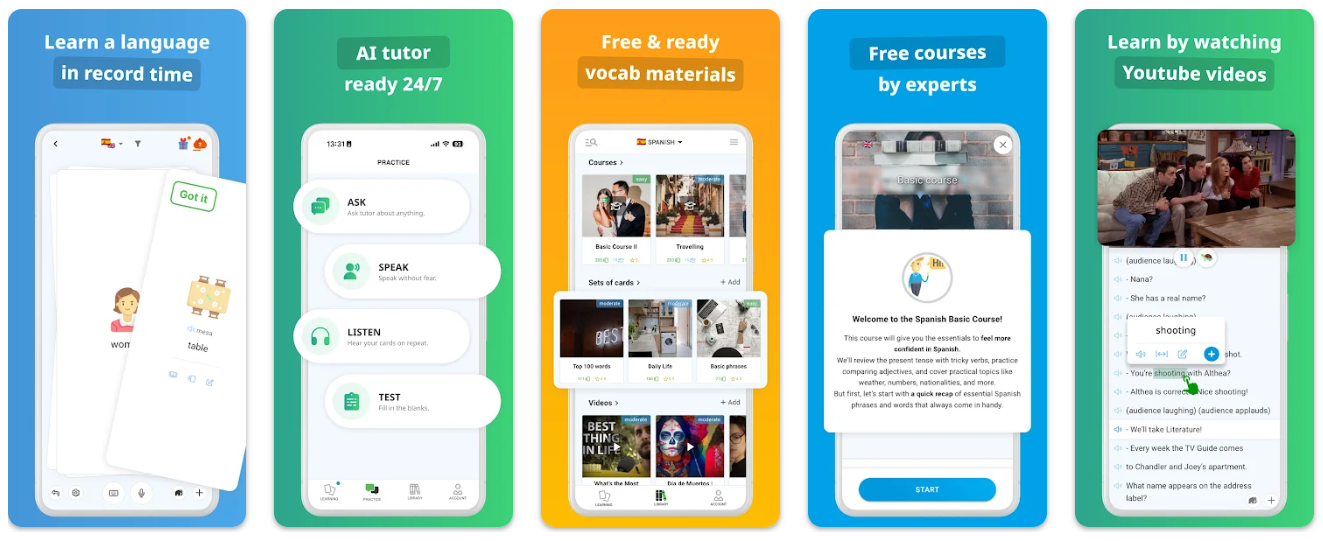
DuoCards uses spaced repetition to help you remember German vocabulary. It features a built-in library of YouTube videos and articles, so you don’t have to hunt for German content yourself because the app already has enough content organized by difficulty level.
When you watch a video or read an article, you can tap any German word in the subtitles or text, translate it instantly with the built-in translator, and save it as a flashcard with one click. The app even lets you jump back to the exact moment in a video where a word was used, so you always have context. You can also add your own YouTube videos, too, as long as they have transcripts.
Pros | Cons |
|---|---|
Large built-in library of German language videos and articles | Free version only allows a small quantity of cards (20 at a time) |
Tap any word to make a flashcard instantly | Translator works better for single words than full sentences |
Jump from a flashcard back to the original subject in the video or article | Ads in the free version interrupt studying |
Built-in image library so you don’t need to find pictures | Premium plan costs more than free apps like Anki |
Fun mascot and gamification that keeps kids and beginners motivated | Some exercises don’t help much with real speaking skills |
Lexilize Flashcards
Available On: Android
Best For: Creating custom flashcards with games and offline access
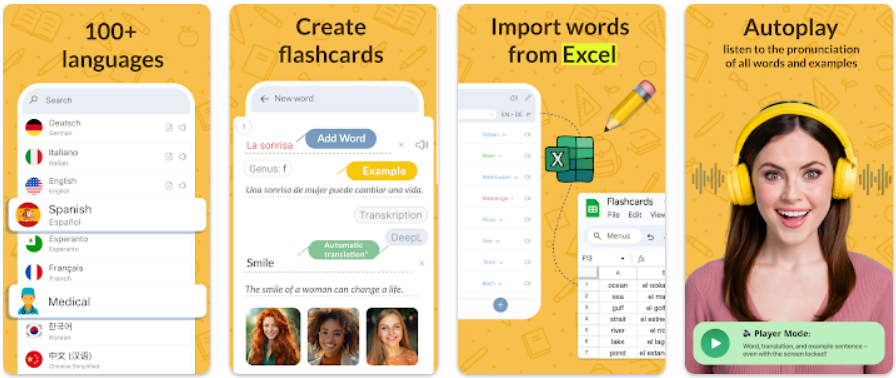
Lexilize Flashcards lets you create your own German flashcard decks and learn through interactive games instead of just flipping cards. The app uses spaced repetition to help you remember vocabulary long-term, and you can organize your flashcards into nested folders by topic, like food, verbs, or family. You can also add your own German words manually or enable auto-translation through the DeepL API if you want faster card creation.
Lexilize works offline, so you can study on planes or anywhere without an internet connection. The app supports over 100 languages and lets you add audio pronunciation to your cards. The free version lets you create flashcards and use basic features, but you’ll need premium to unlock unlimited nested folders and remove ads.
Pros | Cons |
|---|---|
Organize flashcards into folders and sub-folders | Advanced folder features are locked behind a paywall |
Works offline so you can study anywhere | Offline mode has issues on some Samsung phones |
Games make learning feel less like memorizing | Some languages start with no pre-made vocabulary |
Supports over 100 languages | Auto-translation setup is not beginner-friendly |
Add your own pronunciation audio | Cloud backup can fail and progress may be lost |
Spaced repetition helps you remember words | The app pushes notifications even after you turn them off |
Mosalingua
Available On: Android | iOS
Best For: Spaced repetition with authentic German content beyond flashcards
MosaLingua uses spaced repetition flashcards as its foundation, but the app goes beyond basic vocabulary drills by including authentic German videos, dialogues, and real-world materials. You can create your own German flashcards or use pre-made decks organized by topics like travel, business, or everyday conversations. The app tracks which words you struggle with and adjusts your review schedule automatically.
MosaLingua also includes audio from native German speakers so you can practice pronunciation while studying. The problem is that the app feels dated compared to competitors. It sometimes freezes or lags during use too! There’s also zero gamification, so if you need fun visuals or rewards to stay motivated, you’ll get bored quickly.
Pros | Cons |
|---|---|
Uses authentic German videos and dialogues, not just isolated words | Interface looks outdated and uninspiring |
Spaced repetition adapts to your learning pace | No gamification to help with motivation |
Native-speaker audio improves pronunciation | App can freeze or glitch at times |
Create custom flashcards for your own vocabulary | Learning format can feel repetitive |
Works across multiple devices | More expensive than many flashcard apps |
Pre-made decks for travel, work, and daily life | Overall experience feels clunky compared to modern apps |
Quizlet
Available On: Android | iOS
Best For: Using pre-made German flashcard decks from other users
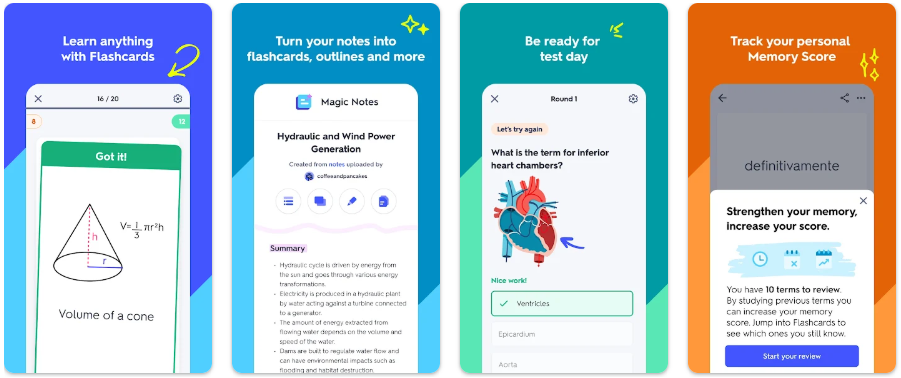
Quizlet is the most popular flashcard app in the world, and thousands of users have already created German flashcard decks you can use for free. You can search for specific topics like "German verbs," "A1 vocabulary," or "German food words," and find hundreds of ready-made decks. The app uses spaced repetition to help you remember words, and you can study through different modes like flashcards, matching games, or practice tests.
You can also create your own German flashcards if you want custom vocabulary. The problem is that quality control doesn’t exist. Anyone can make a deck, so you’ll find decks with spelling errors, wrong translations, or poorly organized words. You have to check every deck carefully before you start studying, which wastes time.
Pros | Cons |
|---|---|
Thousands of ready-made German decks from other users | Deck quality varies and some contain mistakes |
Flashcards, games, and tests keep studying varied | You have to check decks for errors yourself |
Free to use with ads | Ads interrupt study sessions |
Easy to create and share your own decks | Offline mode requires a paid plan |
Works across all devices | Finding high-quality decks takes time |
Noji
Available On: Android | iOS
Best For: Enhanced spaced repetition with over 50,000 pre-made decks
Noji uses an enhanced spaced repetition algorithm that shows you German flashcards right before you forget them. The app already has pre-made flashcard decks for learning German vocabulary, so you can download ready-made sets instead of creating everything from scratch. You can also make your own German flashcards and share them with other learners.
Noji offers different study modes, including writing reviews, multiple choice, and an audio player, to keep things interesting. The interface is clean and simple, which makes it easy to manage thousands of flashcards without feeling overwhelmed. Teachers can create decks and share them directly with students, which makes it useful for classroom learning too.
Pros | Cons |
|---|---|
Over 50,000 ready-made German decks | Deck quality varies and needs checking |
Spaced repetition adapts to how you remember | Smaller community than Anki or Quizlet |
Multiple study modes keep reviews interesting | Harder to find niche German topics |
Clean, simple interface | Not many reviews to judge long-term value |
Teachers can share decks with students | Fewer updates from the community |
Supports multiple languages | Pricing isn’t clearly explained upfront |
How To Use German Flashcards For Improving Vocabulary
The German word for flashcard is "Lernkarte," which literally means "learning card." And while it has the word "learning" in its name, it doesn't always mean that you can actually learn from it if you don't know how to use it properly.
For example, most people cram hundreds of words in one sitting, forget them the next day, and wonder why they're stuck at beginner level forever. You need to use flashcards strategically, or you'll waste hours memorizing words that never stick.
Here’s how to actually improve your German vocabulary with flashcards:
Draw a picture or symbol on one side
Your brain remembers images better than words, so instead of writing "der Hund = dog," draw a simple dog or print a picture of one. When you see the image, your brain connects it directly to the German word without translating through English first, which is exactly how native speakers think.
Add as many details as possible to each card
Don't just write "essen" and call it done—write the full sentence like "Ich esse einen Apfel" (I eat an apple), add the gender (der, die, das), and include an example that shows how the word is actually used. The more context you give your brain, the easier it is to remember and use the word in real conversations.
Use audio for pronunciation
Write the word on one side, but say it out loud when you flip the card, or better yet, use a German flashcard app with audio so you hear how native speakers actually pronounce it. Reading "Eichhörnchen" (squirrel) is useless if you can’t say it correctly when you need to.
Focus on categories instead of random words
Group your German language flash cards by topics like food, animals, verbs, or family so you're building mental connections. Learning "der Apfel, die Banane, die Orange" together makes more sense than memorizing random nouns that have nothing to do with each other.
Test yourself in both directions
Flip the cards German-to-English and English-to-German because if you only practice one way, you'll recognize words when reading but struggle to recall them when speaking or writing.
Ready To Use Flash Cards?
At the end of the day, flashcards only work if you actually want to use them — and that’s where most apps fall apart. Lingopie is different because it turns vocabulary into something you experience, not just memorize. When words live inside scenes, voices, and stories, they stick, and studying stops feeling like work.
If you’re serious about learning German in a way that feels natural and sustainable, Lingopie is the one worth opening first.

![11 Best Apps to Learn Russian Language [TESTED]](/blog/content/images/2026/01/Apps-to-learn-russian.jpg)
![11 Best Apps To Learn Chinese [TESTED]](/blog/content/images/size/w1200/2024/03/Spanish-1-6.png)

![Dutch Pronouns: A Complete Guide [2026]](/blog/content/images/size/w300/2025/09/Dutch-pronouns-.jpg)
![Polish Grammar Basics For Beginners [Guide]](/blog/content/images/size/w300/2025/07/Polish-grammar.jpg)
