

I've spent the last five months testing Japanese translation apps during my regular trips to Japan. Not in some controlled lab setting, but in actual restaurants where I couldn’t read the menu, at train stations trying to figure out which platform, and in conversations where I desperately needed to know what someone just said.
Some apps failed spectacularly. But the others? They’ve earned their place on my phone, and I absolutely refuse to travel without them. Let’s explore the 6 Japanese translation apps listed below, shall we?
- 6 Best Japanese Language Apps Worth Trying [Guide]
- A Guide To Kansai-ben Dialect For Beginners In Japanese
- Japanese Onomatopoeia: 70+ Words You’ll See In A Manga

Why Use Japanese Translation Apps
Learning Japanese is tough. The writing system alone has three scripts (hiragana, katakana, and kanji), and even basic conversations require understanding context-dependent honorifics that change based on who you're talking to. Translation apps bridge that gap while you're learning by making real-world practice possible before you're fluent.
Here's why they matter:
- Immediate help in real situations – You can't always wait to look up words in a textbook when you're standing at a train station or ordering food.
- Visual learning through camera translation – Seeing kanji translated instantly helps you start recognizing characters faster than memorization alone.
- Confidence boost for beginners – Knowing you have a backup tool makes you more willing to try speaking and reading Japanese in public.
- Context for confusing grammar – Apps show you how words fit together in actual sentences, not just isolated definitions.
- Cultural understanding – Good translation apps include notes on formality levels and when to use specific phrases appropriately.
The key is picking the right app for your specific needs. A tool that's perfect for translating restaurant menus might be useless for learning grammar. An app that excels at conversation might completely butcher written kanji.
Japanese Translation Apps Worth Trying
Lingopie: Best For Learning Through Entertainment

Lingopie isn't a traditional translator. It's a language learning platform that uses actual Japanese TV shows, movies, and music videos to teach you the language naturally. Every show comes with interactive dual subtitles you’ve where you can click any word for instant translations, pronunciation guides, and usage examples pulled from the exact scene you're watching.
I tested this extensively with a slice-of-life drama called "Midnight Diner." Within two episodes, I'd picked up casual restaurant phrases I'd never encountered in textbook Japanese. Words like お疲れ様 (otsukaresama) made sense because I saw when and how characters used them, not just what they meant. The Grammar Coach feature spots patterns you might miss, and the spaced repetition flashcards pull directly from shows you’ve watched.
After three months, my conversational Japanese improved noticeably because I'd absorbed natural speech patterns instead of memorizing isolated vocabulary lists.
Pros:
- Context-based learning through real TV shows and movies
- Interactive subtitles with instant word lookup
- Grammar Coach explains patterns as they appear naturally
- Flashcards tied to actual scenes you've watched
- Works for beginners through advanced learners
- Builds cultural understanding alongside language skills
Cons:
- Requires consistent engagement, not just quick lookups
- Smaller content library than mainstream streaming services
- Monthly subscription required
- Not ideal for instant translation while traveling
Waygo: Best For Translating Kanji Characters
Waygo uses your phone's camera to translate Japanese text in real time. Point it at a restaurant menu, and you instantly see English translations overlaid on the screen. This saved me countless times in small restaurants with no English menus, and the app recognized even stylized kanji on handwritten specials boards.
The offline mode is crucial since you don't need internet to translate, which matters when you're in rural areas or don't want to pay for international data. I used this extensively in Kyoto's back-alley restaurants where WiFi was nonexistent. The app correctly identified dishes like 親子丼 (oyakodon) and even provided ingredient breakdowns. It occasionally struggles with context though.
Pros:
- Instant camera translation of printed text
- Works completely offline
- Handles stylized and handwritten kanji well
- Great for menus and street signs
- Fast processing with no lag
Cons:
- Only 10 free translations per day
- Struggles with handwritten text sometimes
- Digital screens can be hit or miss
- Misses cultural context in translations
- Limited to visual text only
Papago: Best For Natural Conversations
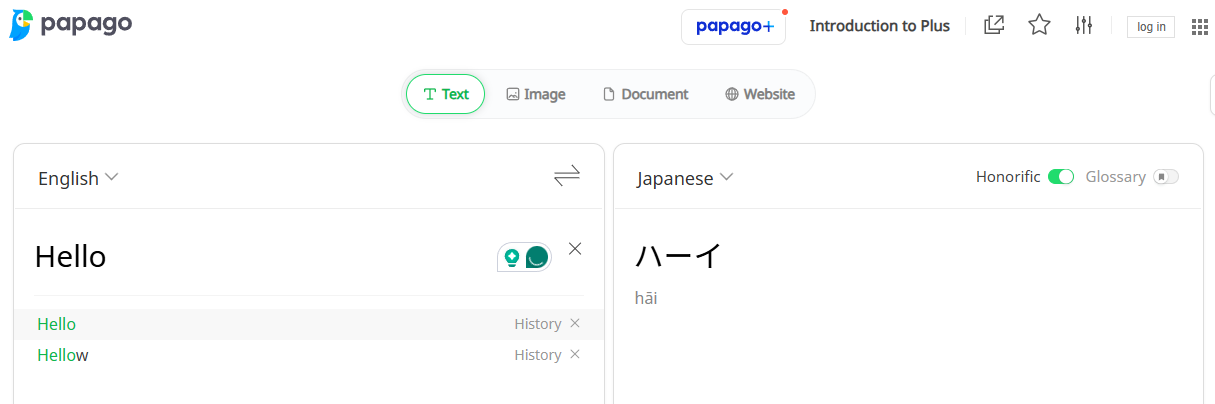
Papago, developed by Naver (Korea's version of Google), handles conversational Japanese better than most competitors. The translations sound natural instead of robotic, which matters when you're actually trying to communicate with someone. The voice translation feature works impressively well—I'd speak English into my phone, it would output natural Japanese, then the other person could respond in Japanese and hear English.
Unlike Google Translate’s sometimes awkward phrasing, Papago understands context. When I typed "Can you recommend something?" in a restaurant context, it suggested the polite おすすめはありますか (osusume wa arimasu ka) instead of a literal translation that would sound odd. I used this constantly for asking directions, and the app correctly adjusted formality levels based on my phrasing.
Pros:
- Natural-sounding conversational translations
- Excellent voice translation for real-time conversations
- Adjusts formality levels appropriately
- Completely free with no limits
- Good image translation for signs
- Understands context better than competitors
Cons:
- Voice recognition struggles with background noise
- Requires downloading language packs for offline use
- Not as strong for technical or literary translation
- Occasional errors with complex grammar
Takoboto: Best For Dictionary Functions
Takoboto functions more as a comprehensive Japanese dictionary than a quick translator. It excels at deep dives into individual words rather than full sentence translation. Every kanji entry shows proper stroke order through animated demonstrations, which helped me learn to write characters correctly instead of just recognizing them.
The example sentences pull from real usage, showing you how words function in actual contexts. When I looked up 大丈夫 (daijoubu), I got examples ranging from "I'm fine" to "It's okay" to "Are you sure?" with context explaining when to use each. Takoboto became my study companion rather than my travel tool.
After encountering new words through other apps or conversations, I'd look them up in Takoboto for deeper understanding. The kanji breakdown is particularly valuable—each character shows its radicals (component parts), making it easier to remember complex kanji by understanding their structure.
Pros:
- Comprehensive dictionary with detailed definitions
- Animated kanji stroke order demonstrations
- Real usage examples with context
- Kanji breakdown by radicals
- JLPT level indicators for vocabulary
- Excellent for serious study
Cons:
- Not designed for quick translations
- Dated interface compared to modern apps
- Better for learning than traveling
- Ads in free version can be intrusive
- Slower to use than instant translation apps
Yomiwa: Best For Reading Japanese Text
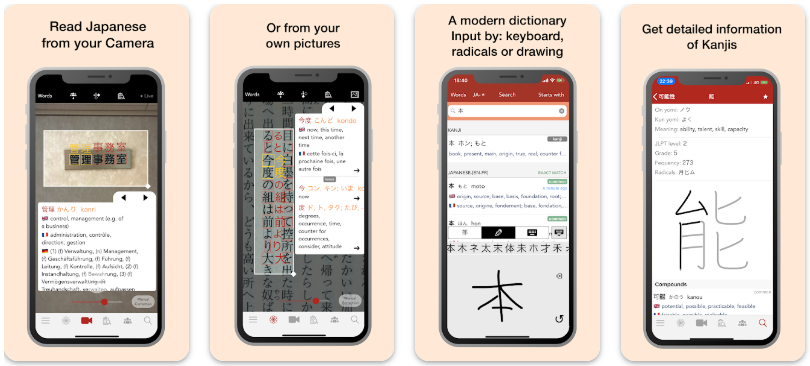
Yomiwa combines OCR (optical character recognition) with dictionary functions. Point your camera at Japanese text, and it identifies each character while providing definitions and readings. Reading manga with Yomiwa changed my study approach entirely—I could enjoy actual Japanese comics without constantly flipping to separate dictionaries.
The app recognized even small text in speech bubbles and provided furigana (pronunciation guides) for difficult kanji. The handwriting recognition impressed me too. I could draw kanji I didn't know how to type, and Yomiwa would identify them. This solved countless moments of "I recognize this character, but have no idea how to search for it." I used this primarily for books and manga purchased in Japan, and the app handled various fonts and printing styles well.
Pros:
- Excellent OCR for manga and books
- Handwriting recognition for unknown kanji
- Furigana provided for difficult characters
- JLPT level indicators for vocabulary
- Works with various fonts and styles
- Great for self-study with native materials
Cons:
- Monthly subscription feels expensive
- Requires good lighting for camera recognition
- Struggles with very stylized fonts
- Not ideal for conversations or signs
- Limited free version
DeepL: Best For Accurate Long-Form Translation
DeepL's neural network produces translations that often surpass Google Translate in accuracy and naturalness. It's particularly strong with longer passages where context matters. The translations actually sound like something a human would write—when I translated a formal Japanese email about a business inquiry, DeepL maintained the appropriate politeness level and business tone in English.
It handles nuance better than literal translation apps. Japanese frequently omits subjects that English requires, and DeepL infers these correctly more often than competitors. I used DeepL primarily for understanding longer content like news articles and blog posts. It provided coherent English that preserved the original meaning instead of producing confusing word-by-word translations.
The app also works in reverse—my English emails translated to Japanese came out grammatically correct with appropriate formality, and native speakers confirmed the phrasing sounded natural.
Pros:
- Superior accuracy for long-form content
- Maintains tone and formality appropriately
- Handles nuance and context exceptionally well
- Works well in both directions (English-Japanese)
- Clean, professional interface
- Good for business communication
Cons:
- 5,000 character limit on free version
- Not designed for real-time conversation
- Requires typing or pasting text
- Monthly subscription for unlimited use
- Not ideal for quick lookups or signs
How To Use Japanese Translators
Translation apps are tools, not magic solutions. Here's what I learned about using them properly.
Don't Rely on Translation Alone
Apps give you words, not understanding. When Papago translated おつかれさまでした as "good work," it missed the cultural context. This phrase acknowledges someone's effort and shows respect. You'd say it to coworkers leaving the office, but the English "good work" doesn't capture that nuance.
Use translation apps to discover words, then research their actual usage through context (which is where Lingopie excels).
Verify Important Translations
I almost made an embarrassing mistake at a business dinner because I trusted a quick translation without double-checking. The phrase I'd prepared actually sounded too casual for the formal setting. A Japanese colleague gently corrected me before I used it.
For anything important (business communication, formal situations, potential conflicts), verify translations through multiple sources or native speakers.
Combine Multiple Apps
I kept three apps on my phone's home screen: Waygo for instant kanji reading, Papago for conversations, and Lingopie for deeper learning. Each handled specific situations better than trying to use one app for everything.
Quick menu translation? Waygo. Asking directions? Papago. Actually improving my Japanese? Lingopie.
Learn Japanese With Lingopie
After testing six apps across five months of real-world use, Lingopie stands out as the only one that fundamentally changed how I approach Japanese. Unlike basic reference tools, it actually teaches you to stop needing translation apps altogether because it has everything on the screen: dual translations!
The biggest advantage? Lingopie prepares you for actual Japanese communication by exposing you to how native speakers actually talk. It's no wonder that I noticed real improvement around the two-month mark. Conversations that previously required constant assistance from Papago became manageable on my own. I could understand casual Japanese speech patterns because I'd encountered them dozens of times in Lingopie's shows.
If your goal is surviving a week-long Tokyo vacation, translation apps will serve you fine. If your goal is actually learning Japanese, start with Lingopie and use translation apps as supplementary tools.

![5 Best Chinese Translation Apps For Learners [REVIEWED]](/blog/content/images/2026/01/Best-chinese-Translation-Apps.jpg)



![Japanese vs Korean: Which Language Should You Be Learning? [2026]](/blog/content/images/size/w300/2026/03/Japanese-vs-Korean.jpg)