
Three months before my Italy conference, I had a problem. I spoke zero Italian. Not "rusty high school Italian" zero—complete beginner zero. My native language is Tagalog, so I didn't even have that Spanish or French background some people lean on. Just me, a plane ticket, and a very real need to not embarrass myself in front of Italian colleagues.
So I did what any desperate professional does: downloaded every Italian translator app I could find and tested them. Because honestly, it did. So in this post, I'll walk you through the six apps I actually used, what worked during real situations in Italy, and which one I still open every day.
- How Long Does It Take To Learn Italian? [Guide]
- 100+ Basic Italian Phrases To Use When You Jet Off
- How Many Italian-Speaking Countries Are Out There?

Why Use English to Italian Translation Apps
Learning Italian the traditional way wasn't an option for me. Evening classes and private tutors simply didn't fit my schedule or budget. What gave me total control over what I learned and when are translation apps.
The way I used it is by making a list of words I'd definitely encounter at the conference—"meeting," "presentation," "bathroom," "coffee." I'd search each one, write it in my notebook with pronunciation guides, and practice during lunch breaks. No curriculum, no schedule.
By the time I landed in Italy, I could read signs, order meals, and handle basic conversations.
Best Italian Translator Apps
Here's what I tested over three months and what actually delivered.
Lingopie: Best for Learning Through Italian Entertainment
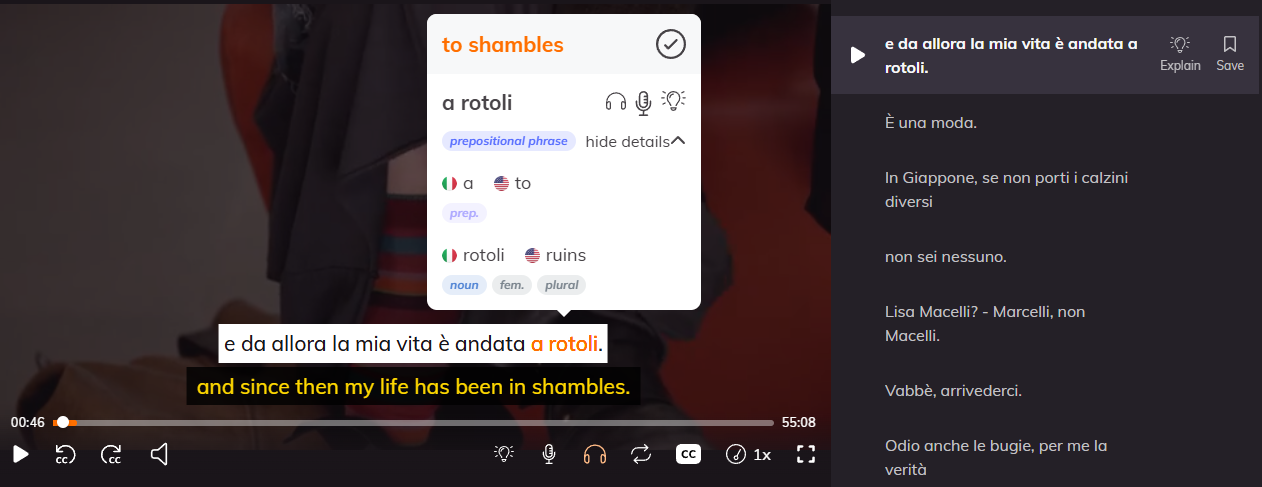
Lingopie became my daily habit purely by accident. I downloaded it thinking it was just another translation tool, but it's actually a language learning platform that uses real Italian TV shows and movies with interactive subtitles. You click any word in the dual subtitles and get instant definitions, pronunciation, and the option to save it as a flashcard.
The flight to Italy sealed the deal. Fourteen hours stuck in a window seat, and I binge-watched an entire Italian cooking show. By hour six, I was so engaged while getting that active learning working for me. That's when I realized this app had done more for my comprehension in one flight than two months of traditional studying.
| Pros | Cons |
|---|---|
| Learn from real Italian TV shows and movies | Requires internet connection for streaming |
| Interactive subtitles with instant translations | Can feel overwhelming for absolute beginners at first |
| Works perfectly for passive learning during downtime | Subscription cost (though worth it in my experience) |
| Actually enjoyable—doesn't feel like studying | Limited offline functionality |
| Great for building listening comprehension quickly | May need supplementary apps for grammar foundations |
OpenL: Best for Quick, No-Hassle Translations
OpenL is a translator app that provides 10 free translations daily, without requiring an account. I used it when I needed a fast answer and didn't want to deal with login screens or subscription prompts. Perfect for those moments when you're looking at an Italian email and need to know what it says right now.
The con? Well, the daily limit is pretty bad! Ten translations sounds reasonable until you're actually learning a language and burning through your quota by lunchtime. I'd hit my limit, get frustrated, and switch to another app.
| Pros | Cons |
|---|---|
| No account or login required | Only 10 free translations per day |
| Clean, simple interface | Hits usage limit fast if you're actively learning |
| Fast translations without ads or clutter | No additional learning features (just translation) |
| Good for occasional quick lookups | Not suitable for daily language practice |
| Completely free for basic use | Limited functionality compared to competitors |
Italian English Dictionary: Best for Deep Word Understanding
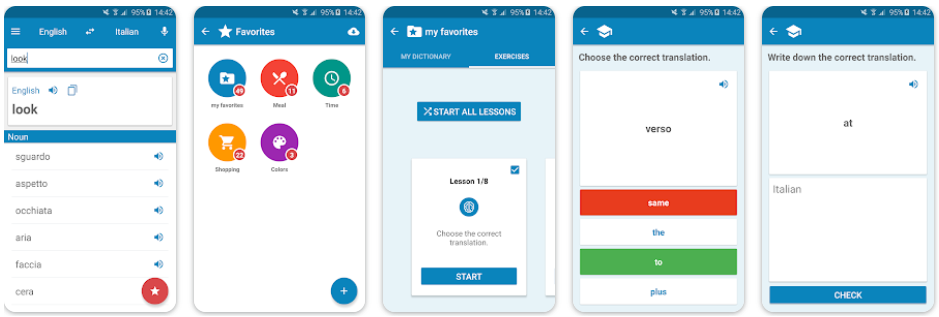
Italian English Dictionary is exactly what it sounds like—a comprehensive dictionary app with over 200,000 entries. I used it when simple translations weren't enough, and I needed to actually understand a word’s nuances. The audio pronunciation files saved me multiple times, especially with words like "bruschetta" that I'd been butchering my entire life.
The problem is it's just a dictionary. No flashcards, no learning tools, no context sentences showing you how Italians actually use the word. I'd look up "riunione" (meeting), get a perfect definition and pronunciation, then close the app with no way to practice or remember it later.
| Pros | Cons |
|---|---|
| Massive database with 278,000+ entries | Just a dictionary—no learning features |
| Audio pronunciation for correct speaking | No context sentences or usage examples |
| Works offline once downloaded | Doesn't help with retention or practice |
| Detailed definitions beyond basic translation | Interface feels dated compared to modern apps |
| Available for Apple devices | No flashcard or spaced repetition system |
iTranslate: Best For Real-Time Voice Conversations
iTranslate handles both text and voice translation. The voice recognition feature let me practice pronunciation before the conference—I'd speak Italian phrases out loud and see if the app understood me. If it couldn’t recognize what I said, I knew my pronunciation needed work. However, it struggled with my accent initially, and background noise at the conference made it nearly useless in crowded spaces.
| Pros | Cons |
|---|---|
| Voice recognition for pronunciation practice | Voice feature struggles with accents and background noise |
| Works offline after downloading language packs | Not reliable in crowded or noisy environments |
| Provides synonyms for vocabulary variety | Can be overwhelming when you just need one translation |
| Good for real-time conversation assistance | Free version has limited features |
| Supports bilingual learning simultaneously | Accuracy drops in complex sentences |
Dictionary Linguee: Best for Authentic Usage Examples
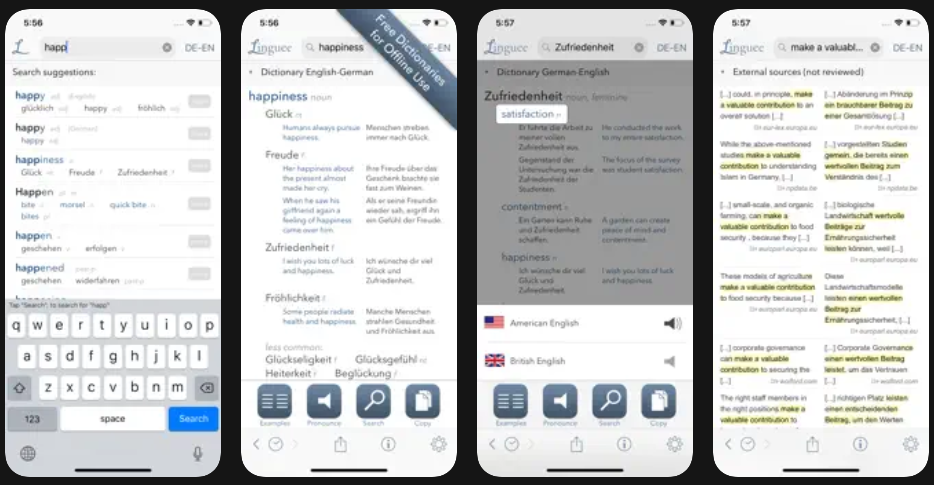
Dictionary Linguee is a good tool for learners because aside from the definition, it pulls examples from authentic Italian sources (like websites, documents, publications) so you see the word in actual context. The offline access was also convenient, and the interface made it easy to browse through multiple example sentences quickly.
But if you ask me, it's not comprehensive for specialized vocabulary—I'd occasionally search for technical terms related to my work and come up empty. Dictionary Linguee excels at common words and phrases used in everyday Italian, less so at niche or industry-specific terminology.
| Pros | Cons |
|---|---|
| Real sentences from authentic Italian sources | Limited coverage of specialized or technical terms |
| Shows contextual usage, not just definitions | Can be overwhelming with too many examples |
| Helps distinguish formal vs. casual language | Not ideal for niche industry vocabulary |
| Works offline after setup | Examples sometimes lack clear explanations |
| Intuitive interface for quick browsing | Focuses on European Portuguese/Italian variants |
Google Translate: Best for Quick Translations and Emergencies
Google Translate was my safety net throughout the entire trip. Need to read a sign at the train station? Point your camera and get instant translation. Completely blank on how to ask where the bathroom is? Type it in English and show the Italian translation to someone. It handles emergencies fast, which is exactly what you need when you're navigating a foreign country on a tight schedule.
But Google Translate is terrible for actually learning Italian. Sure, it translates, but it doesn't teach you anything. I'd look up the same phrase three times in one week because nothing stuck. The translations also get weird with longer sentences or idiomatic expressions.
| Pros | Cons |
|---|---|
| Camera translation for signs and menus | Terrible for retention—nothing sticks |
| Fast and reliable for emergency situations | Awkward translations for complex sentences |
| Completely free with no limits | Doesn't teach grammar or context |
| Works offline with downloaded languages | Idiomatic expressions often translate poorly |
| Supports voice, text, and image translation | Becomes a crutch that prevents actual learning |
How To Use Italian Translation Apps When Learning Italian
Here's the routine that actually worked with my one-hour daily limit. I didn't use all six apps every day—that would've been chaos. Instead, I built a rotation based on what I needed and how much energy I had. Active learning days meant grammar and vocabulary. Exhausted days meant passive watching. The key was showing up consistently, even when I only had 20 minutes and zero motivation.
My actual daily workflow:
- Start with your priority list. Write down 10-15 words you'll actually need (conference terms, food, directions), then look them up and practice pronunciation.
- Use one main learning app daily. I rotated between Lingopie for shows and OpenL for quick translations, depending on my energy level.
- Keep Google Translate for emergencies only. The more you rely on instant translation, the less your brain retains—use it sparingly.
- Practice speaking out loud, even alone. Use iTranslate's voice feature to check if your pronunciation is intelligible, not just correct in your head.
- Review context with Dictionary Linguee. When a word keeps popping up, check how it's actually used in real Italian sentences to understand nuance.
- Don't skip days, but don't force perfection. Ten minutes of watching Italian content beats zero minutes of guilt about not doing grammar drills.
The biggest mistake I made early on was trying to use every app equally. That's exhausting and pointless. Pick one primary learning tool (mine was Lingopie), then use the others as support when you hit specific gaps. Translation apps work best when they complement each other, not compete for your limited time.
Learn Italian With Lingopie Instead
After three months of testing six different apps, Lingopie is the only one I still use daily. It's not because the others were bad—they all served specific purposes. But Lingopie was the only app that made learning Italian feel effortless. I'd open it during lunch, thinking "I'll just watch one episode," and suddenly 30 minutes passed without me noticing I was actively learning.
If you're learning Italian on limited time and need something that actually sticks without feeling like a second job, start with Lingopie. Use the other apps when you need them (quick translations, grammar clarification, emergency lookups) but make entertainment-based learning your foundation.
Trust me, you'll enjoy the process more, and ironically, that's exactly why it works better.

![5 Best Portuguese Translator Apps For Learners [REVIEWED]](/blog/content/images/2026/01/Best-Portuguese-Translation-Apps.jpg)



![17 Best Italian Series and Movies On Netflix [For Beginners]](/blog/content/images/size/w300/2026/02/Italian-TV-Shows.jpg)
![How To Say I Love You In Italian Like A Native Speaker [Guide]](/blog/content/images/size/w300/2025/01/I-Love-You-In-Italian.jpg)
