
Look, Russian is hard. Like, genuinely one of the most brutal languages you can pick up as an English speaker. You’ve got a whole new alphabet, six grammatical cases that change word endings constantly, and verb aspects that'll make your head spin. In fact, most language difficulty scales estimate 1,100+ hours to fluency. That's not them being dramatic.
So yeah, you need all the help you can get. Flashcards are honestly one of your best tools for actually remembering all this stuff. Not the sad paper cards from high school. We're talking proper spaced repetition apps that work with how your brain learns. I tested a bunch to figure out which ones are actually worth your time and which ones you can skip entirely
(Spoiler: some of the most popular ones aren't even the best).
- 11 Best Apps to Learn Russian Language [TESTED]
- How To Learn Russian Fast: Easy Step-by-Step Guide
- Russian Alphabet: Everything You Need to Know

How To Use Flashcards When Learning Russian
Making flashcards isn't enough. You need to use spaced repetition, which means reviewing cards right before you're about to forget them. Your brain remembers better when it has to work a little to recall something. Most good flashcard apps handle this timing automatically, so you don't have to guess when to review.
Tips that actually work:
- Start with high-frequency words first. Learn the 1,000 most common Russian words before you waste time on "butterfly" or "umbrella." You'll use "я хочу" (I want) way more than "бабочка."
- Add context, not just translations. Don't make cards that just say "книга = book." Add an example sentence like "Я читаю книгу" (I'm reading a book). Your brain needs to see how words actually get used.
- Include audio on every card. Russian pronunciation is tricky. You need to hear how native speakers say things, not just guess based on the letters. Most apps let you add audio clips.
- Review daily, even if it's just 10 minutes. Consistency beats marathon sessions. Your brain needs regular exposure to move stuff from short-term to long-term memory.
- Don't be afraid to delete cards. If you've mastered a word, retire it. If a card confuses you every single time, remake it with better context. Your deck should work for you, not against you.
Best Russian Language Flashcards
Lingopie
Publisher: Lingopie
Availability: Android | iOS
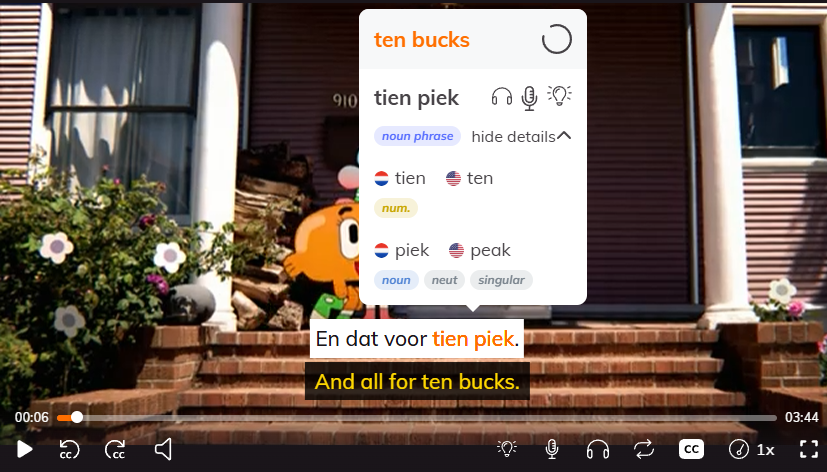
Lingopie takes a completely different approach to flashcards. Instead of pre-made decks someone else created, you build your own flashcards while watching Russian TV shows and movies. When you see a word you don't know in the subtitles, you click it, and the app instantly creates a flashcard with the exact scene, audio, and context from what you're watching.
So if you're watching a Russian crime drama and someone says "преступник" (criminal), your flashcard has that actor saying the word in that specific scene. It's honestly way more memorable than studying random word lists because your brain connects the word to an actual moment.
The platform has a decent library of Russian content, from soap operas to documentaries. You can adjust subtitle settings, slow down playback if native speed is too fast, and the spaced repetition system handles your review schedule automatically. The flashcards sync across devices, so you can watch on your laptop and review cards on your phone during lunch breaks.
| Pros | Cons |
|---|---|
| Flashcards come from real shows you're actually watching | Smaller Russian content library compared to Spanish or French |
| Audio is always native speaker pronunciation in natural context | Monthly subscription cost (no free tier) |
| Way more engaging than studying random vocabulary lists | Limited grammar explanations on flashcards |
| Spaced repetition built in | Some shows have awkward subtitle timing |
| Works on mobile and desktop | Can't import your own decks |
Brainscape
Publisher: Brainscape
Availability: Android | iOS
Brainscape is all about their "confidence-based repetition" system, which sounds fancy but is actually pretty simple. When you study a card, you rate yourself from 1 to 5 on how well you knew the answer. Know it perfectly? You won't see it again for a while. Totally blanked? It'll come back soon. The app adjusts how often you see each card based on your ratings, which supposedly makes you learn faster than regular spaced repetition.
What sets Brainscape apart is the sheer amount of pre-made content. They've partnered with actual Russian language experts and publishers to create certified flashcard decks, so you're not just relying on some random person's homemade cards. There are also over a million user-created decks you can browse through. You can make your own cards too, adding text, images, and audio files.
| Pros | Cons |
|---|---|
| Huge library of expert-created Russian decks | Gets pricey if you want the good stuff |
| The 1-5 rating system feels more nuanced than just "know it/don't know it" | Free version is pretty limited |
| Can create cards with audio for pronunciation practice | So many decks available it's overwhelming to choose |
| Works on mobile and desktop | The rating system requires honest self-assessment (easy to cheat yourself) |
| AI Copilot feature helps improve your cards | Some user-created decks have errors or outdated info |
Learn Russian Words
Publisher: Tobo Languages
Availability: Android
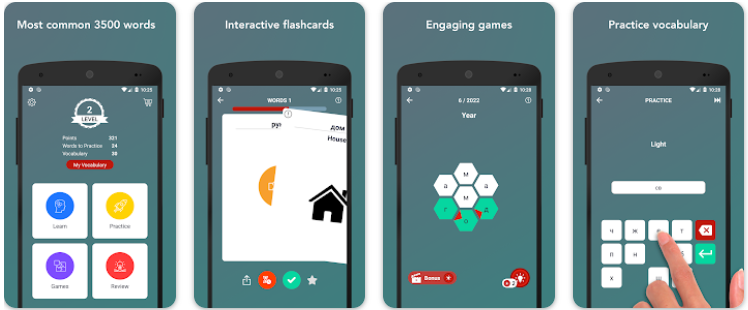
Learn Russian Vocabulary Words gives you 3,500 words organized by level, from A1 beginner stuff all the way up to C2 advanced. The flashcards have a simple swipe system. Swipe right if you know the word, swipe left if you want to see it again later. Each card has audio pronunciation, and most have images on the back to help you remember the word visually. The app pushes you to build a daily habit of learning five words a day, which is actually pretty manageable.
What makes this app different is the gamification element. You earn points by learning and practicing words, then you can use those points to unlock phrasebooks and word lists for different topics. There are also word games mixed in to keep things interesting when you're bored of just flipping cards. The whole thing is free with ads, which is rare for flashcard apps that actually work.
| Pros | Cons |
|---|---|
| Completely free (just has ads) | The writing exercises can be frustrating for beginners |
| Super simple interface, easy to jump right in | Words are auto-categorized based on whether you get them right, which isn't always accurate |
| 3,500 words is a solid vocabulary base | Images aren't available for every single card yet |
| Audio pronunciation for every word | Can feel repetitive after a while |
| No pressure, learn at your own pace | The gamification might feel childish to some people |
| Point system makes unlocking new content feel rewarding | Ads can be annoying if you're using it a lot |
Reword
Publisher: POAS Apps
Availability: Android | iOS
ReWord's standout feature is how easy it makes creating your own flashcards. Type in a Russian word and the app automatically fills in the translation, grabs an image, and adds example sentences. You don't have to hunt for all that stuff yourself. The built-in dictionary has thousands of words organized by category, and you can study completely offline, which is clutch if you're on the subway or don't want to burn through data.
The stats tracking is pretty detailed too. You can see your memory retention over the past week, month, three months, or year, which helps you figure out if you're actually retaining stuff long-term or just cramming. Set a daily goal, hit it consistently, and watch your vocabulary grow. There's a night theme if you study before bed.
| Pros | Cons |
|---|---|
| Auto-fills translations, images, and examples when you create cards | Ads in the free version |
| Works completely offline | Interface is pretty bare-bones |
| Detailed long-term progress tracking | Smaller Russian community than other apps |
| Night theme for evening studying | No games or gamification |
| Simple, distraction-free design | Less flashy than competitors |
DuoCards
Publisher: Duocards
Availability: Android | iOS
DuoCards goes beyond basic flashcards by letting you learn from YouTube videos. Watch videos with Russian subtitles, tap any word you don't know, and the video pauses while the app translates it and saves it to your deck. You can also read Russian articles and save new vocabulary as you go. The AI tutor feature suggests new words and phrases based on your level, so you're not just randomly picking what to study next.
The app supports 50+ languages and has over a million downloads, so the community is pretty active. You can also share decks with friends or collaborate on learning together, which is cool if you have a study buddy.
| Pros | Cons |
|---|---|
| Learn vocab directly from YouTube videos you're watching | AI translations aren't always accurate |
| AI tutor adapts to your level | Listening mode is super laggy |
| Can share and collaborate on decks with friends | Cards only show up in alphabetical order |
| Works for 50+ languages | No offline mode |
| Detailed progress analytics with heatmaps | Gender support for nouns is weak |
| Free with ads, no subscription needed | Some features feel half-baked based on reviews |
Ready To Actually Enjoy Studying Russian?
Look, all these apps work. But if you're tired of staring at random word lists and want to learn Russian the way you'd actually use it (you know, in real conversations and shows), Lingopie's worth checking out.
With Lingopie, you're building flashcards from TV shows you're already watching anyway. The words stick because you remember the scene, the context, the exact moment someone said it. That's way more powerful than memorizing "стол means table" for the 47th time.
Try it free and see if learning Russian actually feels less like homework for once.


![5 Dutch Translation Apps You Need To Install [RANKED]](/blog/content/images/size/w1200/2026/01/Best-dutch-translation-apps.png)
![Is Russian Hard to Learn? A No-Nonsense Guide [2026]](/blog/content/images/size/w300/2026/03/Is-Russian-Hard-To-Learn.jpg)