
![5 Dutch Translation Apps You Need To Install [RANKED]](/blog/content/images/size/w1200/2026/01/Best-dutch-translation-apps.png)
Dutch isn't an easy language to crack. The grammar shifts constantly, words stretch on forever, and those guttural sounds feel impossible. You need every resource available. Textbooks help. Language partners are great. But when you're at Albert Heijn trying to read labels or deciphering your landlord’s email, you need something faster.
Translation apps aren’t just helpful when learning Dutch. They’re necessary. Whether you're a complete beginner or an intermediate learner who still blanks on words, having a reliable app makes daily life manageable. I’ve ranked the five best Dutch translation apps based on accuracy, ease of use, and how well they handle Dutch's quirky grammar.
- 40+ Easy Dutch Phrases For Daily Life
- 6 Best Apps To Learn Dutch As A Total Beginner
- What’s The Best Way To Learn Dutch On Your Own?

Why Use Translation Apps
Learning Dutch means constantly encountering words you don’t know. You can't pause every conversation to flip through a dictionary. You can't ask your colleagues to repeat themselves five times. Translation apps give you instant answers when you're in the middle of real situations.
Here's what makes them practical:
- Instant lookups during conversations – Someone says a word you don't recognize. Pull out your phone and check it in seconds.
- Understanding written Dutch – Signs, menus, product labels, apartment contracts. You'll encounter Dutch text everywhere.
- Checking your own Dutch – Before you send that email or text message, verify you're actually saying what you think you're saying.
- Learning pronunciation – Most apps include audio. You can hear how words actually sound instead of butchering them.
- Context matters – Dutch words change meaning based on context. Good translation apps show you multiple definitions and example sentences.
The best part? You always have these apps with you. No lugging around heavy dictionaries. No waiting until you get home to look something up. Your phone becomes a portable Dutch tutor that works whenever you need it. That makes the difference between struggling through daily tasks and actually functioning in the Netherlands.
Dutch Translation Apps
Lingopie
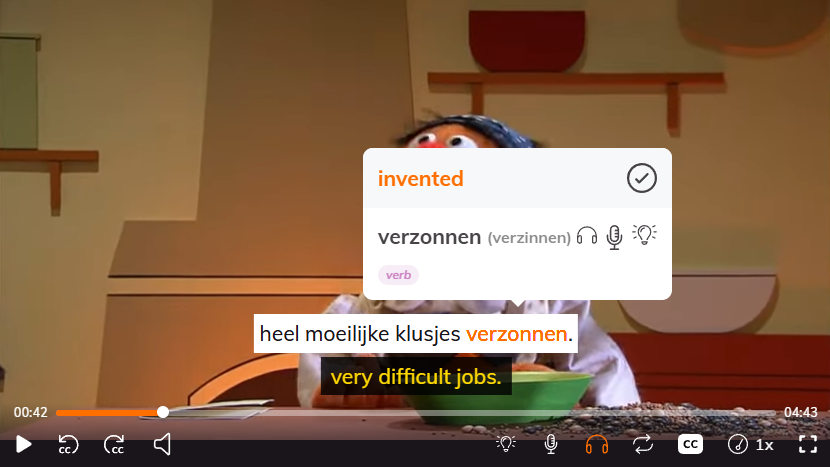
Lingopie lets you watch Dutch movies, and TV shows with interactive subtitles. Click any word, and you get an instant translation. That's it. You're learning vocabulary while watching content you'd actually enjoy. Most translation apps give you definitions in a vacuum. Lingopie shows you how words work in real conversations with native speakers. The context sticks better than memorizing lists.
If you learn better by doing than studying, this beats traditional apps for building actual comprehension.
| Pros | Cons |
|---|---|
| Learning feels natural because you're watching actual content | Limited content library compared to Netflix |
| Interactive subtitles let you click words instantly | Monthly subscription required (no free tier) |
| Saves words to flashcards automatically | Content focuses on European Dutch, not Belgian |
| Shows how Dutch is actually spoken in context | Some shows have regional accents that confuse beginners |
| Works on phone, tablet, and computer | Requires consistent practice to see progress |
DutchDict
DutchDict is a straightforward Dutch translation app that does text, photo, and voice translation. You type a word or phrase and get the Dutch translation. You can also snap a picture of Dutch text, and it'll recognize and translate it. The voice feature lets you speak in Dutch or English and get instant translations. It's basic but reliable for daily lookups when you need a quick answer.
| Pros | Cons |
|---|---|
| Free version available | iOS only (no Android version) |
| Photo translation works for signs and menus | Can't change the Dutch voice (stuck with "Ellen") |
| Voice input for hands-free translation | Voice pronunciation can be hard to understand |
| Saves translations for review later | Limited features in free version |
| Lightweight app that doesn't drain battery | Some users find the voice speed too fast |
Translator Guru
Translator Guru handles voice, text, and camera translations in over 100 languages including Dutch. You speak into your phone and it translates your words instantly. The camera feature works well for menus and street signs. The standout feature is the translator keyboard that works inside WhatsApp, Facebook Messenger, and other messaging apps. You type in English and it translates before sending.
Just note that the free version has ads and limited translations. The paid version removes ads and gives you unlimited use.
| Pros | Cons |
|---|---|
| Works with 100+ languages | Free version is ad-heavy |
| Translator keyboard integrates with messaging apps | Translation quality depends on which service it uses |
| Voice-to-voice conversations work smoothly | Camera translation requires paid version |
| Apple Watch support for quick lookups | Requires internet connection for most features |
| Multiple translation engines for better accuracy | Interface feels cluttered with features |
Dutch - English Translator
Dutch - English Translator is an Android app that covers the basics. You get text translation, photo recognition for signs and documents, and voice input. The app works offline once you download the language packs, which is useful when you don't have data. The dictionary feature shows multiple translation options for single words, helping you pick the right meaning based on context.
| Pros | Cons |
|---|---|
| Works offline with downloaded language packs | Android only (no iOS version) |
| Free to use | Contains ads |
| Photo translation for signs and menus | Some users report bugs after phone updates |
| Includes phrasebook for common phrases | Translation quality varies with context |
| Saves translation history and favorites | Technical issues reported by some users |
DeepL
DeepL is known for producing the most accurate translations, especially between Dutch and English. Multiple independent reviews have confirmed it beats Google Translate and other competitors for Dutch-English pairs specifically. You paste text and get natural-sounding translations that capture nuance better than other apps.
The free version of DeepL limits you to 1,500 characters per translation. You can also upload documents like Word files and PDFs, and DeepL translates them while keeping the original formatting intact.
| Pros | Cons |
|---|---|
| Most accurate Dutch-English translations available | Free version has 1,500 character limit per translation |
| Translates entire documents while preserving formatting | Fewer features than Google Translate |
| Desktop apps and browser extensions available | Camera translation requires mobile app |
| Natural-sounding results that capture context well | Some advanced features require paid subscription |
| Supports 37 languages including Dutch | No offline mode |
 Jonathan Del Prado
The Verdict: Which App Should You Download?
Translation apps help when you're stuck, but Lingopie actually teaches you Dutch. The other apps on this list are useful for reading menus, understanding your landlord's texts, or figuring out what's on product labels at Albert Heijn. They're survival tools. They won't make you fluent.
Lingopie works differently because you're learning from real content:
- You hear Dutch in context - Native speakers having actual conversations, not robotic dictionary definitions
- The learning sticks - Words paired with memorable scenes are way easier to recall than flashcard drills
- It doesn't feel like studying - You're watching shows you'd choose anyway, which means you'll actually keep doing it
- You build natural comprehension - Eventually, you stop translating in your head and just understand what people are saying
Translation apps get you through the day. Lingopie gets you speaking Dutch naturally. Try it free and see how much faster you progress when you're learning through entertainment instead of grinding through vocabulary lists.



![How To Say Happy New Year In Dutch [Plus 10+ Useful Words]](/blog/content/images/size/w300/2025/12/how-to-say-happy-new-year-In-dutch.jpeg)