
Learning Korean is great until you encounter a word that makes zero sense. When that happens (and it will), you need a translator app that actually works. For beginners, these tools are lifesavers: they help you decode restaurant menus, understand K-drama dialogue, and figure out what your language partner just said without the awkward "sorry, what?" moment.
In this post, you'll find six Korean translator apps that are actually worth downloading. Each one has different strengths—some nail conversational Korean, others work offline, and a few can even help you learn while you translate. Let's find the one that fits your needs.
- How To Speak Korean: Classes, Apps, And Immersion Tips
- Korean Aegyo: Korean Words And Gestures To Look And Sound Cute
- 50+ Jokes in Korean That Everyone Should Understand

Why Use Korean Translator Apps
The main reason for using Korean translator apps is to fill the gap between what you know and what you need to understand right now. They help you order food, read signs, double-check grammar, or look up words mid-conversation without fumbling through a textbook.
However, the best apps go beyond simple word-for-word translation—they help you understand context, show you how native speakers actually phrase things, and sometimes even explain cultural nuances you'd otherwise miss.
That said, translator apps aren't magic. They can mess up Korean's context-heavy grammar and honorifics at times. In fact, a polite request can come out sounding rude, or a casual phrase might be weirdly formal. Our advice? Use these tools as backup, not replacements for actual learning.
Best Korean Translation Apps
Papago Translate
Developed by Naver (Korea's biggest search engine), it's specifically designed to handle Korean honorifics, formality levels, and grammar quirks that trip up other translators. The name "Papago" means parrot in Esperanto, which fits since parrots are known for their language skills.
What makes it stand out is the offline mode, conversation feature for real-time chats, and an image translator that can read Korean text in different fonts and even handwriting. If you’re planning to visit Korea or regularly deal with Korean content, Papago should be your first download.
| Pros | Cons |
|---|---|
| Built specifically for Korean language | Limited to 14 languages |
| Handles honorifics and formality well | Some features require account creation |
| Works offline after downloading packs | Occasional slow performance reported |
| Image translation recognizes various Korean fonts | Not as polished for other language pairs |
| Free with no character limits | Translations can still miss nuance |
| Conversation mode for face-to-face talks | Interface can feel busy |
| Integrated dictionary + phrasebook | |
| Study features (flashcards, example sentences) |
DeepL
DeepL has earned its reputation as the most accurate translator on the market, and it added Korean support, such as unlimited translation, the ability to translate entire documents while preserving formatting, in early 2023.
If you're translating important documents, professional content, or anything where tone matters, DeepL is worth the extra effort. Just keep in mind that since Korean is relatively new to DeepL's lineup, it might not always outperform Papago for Korean-specific content.
| Pros | Cons |
|---|---|
| Known for natural, human-like translations | Korean support is relatively new (2024) |
| Excellent for European languages | Only supports 30+ languages vs competitors' 100+ |
| Can translate full documents (Pro) | Free version has character limits |
| Preserves formatting in Word, PDF, PowerPoint | No offline mode |
| Pro version allows honorific selection | Some reviews note Google performs better for Korean specifically |
| Generally more accurate than Google Translate | Pro features require paid subscription |
| Clean, professional interface | Requires internet connection |
Daum Dictionary
Daum Dictionary isn't really a translator in the traditional sense. It's more like a super-powered Korean dictionary that happens to have translation features. Made by Kakao, it’s designed to help you understand individual words deeply rather than just converting sentences from one language to another. When you look up a word, you get multiple meanings, example sentences, Hanja (Chinese characters), and pronunciation guides.
Daum also features a camera search function that allows you to scan Korean text for quick lookups, and you can create custom wordbooks with up to 200 words each. It’s perfect if you’re actively studying Korean and want to understand why a word means what it means, not just what it translates to.
| Pros | Cons |
|---|---|
| Comprehensive word definitions and meanings | Not great for full sentence translation |
| Shows Hanja alongside Korean words | Primarily Korean ↔ English only |
| Example sentences for context | Interface reported as slow sometimes |
| Camera search to scan text | Better as study tool than practical translator |
| Create up to 200 custom wordbooks | Breaks down sentences into separate words |
| Spell checker included | Not ideal for quick conversations |
| Background listening feature | Can feel overwhelming with information |
| Free to use | Requires more effort than simple translation |
Lingopie
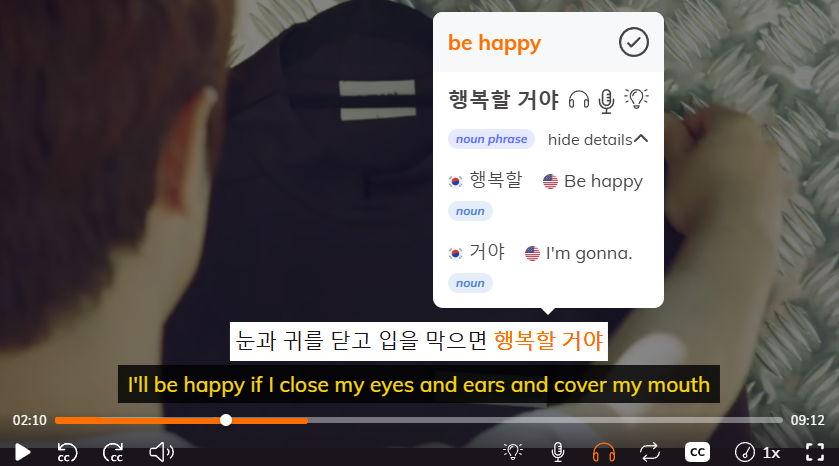
While Lingopie is not a traditional translation app, it’s one of the best Korean learning tools that provides translations for entertaining shows. Click any Korean word for an instant translation, and it automatically saves as a flashcard. You can slow down dialogue, loop sentences, and switch between Korean and English subtitles.
Essentially, Lingoppie is ideal for individuals who genuinely want to learn Korean through K-dramas and shows that delve deeply into the language.
| Pros | Cons |
|---|---|
| Learn through K-dramas and authentic content | Paid subscription ($5.99-12/month) |
| Click any word for instant translation | Not for practical daily translation |
| Auto-saves flashcards from clicked words | Translation quality varies |
| Adjustable playback speed | Needs time commitment |
| Loop sentences and dual subtitles | Not for complete beginners |
| 5,000+ shows available | Better for learning than quick lookups |
Google Translate
Google Translate is the translator everyone knows since it supports more languages than any other app (130+), it’s completely free, and it works pretty much everywhere. For Korean specifically, though, it’s hit or miss because it struggles with honorifics and formality levels. It's great for getting the general idea of what something means, but don't rely on it for anything important or nuanced.
For quick, everyday translations when you just need to figure out what's going on, it gets the job done.
| Pros | Cons |
|---|---|
| Supports 130+ languages (most comprehensive) | Poor with Korean honorifics and formality |
| Completely free to use | Misses tone and context frequently |
| Works offline after downloading languages | Can make polite speech sound rude (or vice versa) |
| Available everywhere (phone, web, browser extension) | Accuracy varies greatly (55-94% depending on language) |
| Multiple input methods (text, voice, image, handwriting) | Struggles with Korean's context-heavy grammar |
| Conversation mode for back-and-forth | Better for "gist" than accurate translation |
| Most widely recognized/trusted brand | Word-for-word approach misses meaning |
Microsoft Translator
Microsoft Translator translates text, voice, and images, works offline, and is free. The one thing it does better than most apps is group conversations, where multiple people can translate together in real-time using their own phones. If you’re already using Microsoft products or need that group feature, it works. Otherwise, other Korean translators in this list can handle Korean better.
| Pros | Cons |
|---|---|
| Group conversation mode for multiple people | Not built specifically for Korean |
| Supports 100+ languages including Korean | Struggles with honorifics and formality |
| Completely free to use | Less popular means fewer updates/improvements |
| Works offline | Not as accurate as Papago for Korean |
| Clean interface | No standout features for Korean learners |
| Text, voice, and image translation | Better alternatives exist |
Comparison Table Of Korean Translator Apps
If you're trying to figure out which Korean translator app to download, this comparison breaks down what actually matters.
| App | Best For | Cost | Offline Mode | Korean Accuracy | Key Feature |
|---|---|---|---|---|---|
| Papago | Korea-specific translation | Free | Yes | Excellent | Built for Korean, handles honorifics well |
| DeepL | Natural-sounding translation | Free + Paid | No | Very Good | Most accurate overall, newer for Korean |
| Daum Dictionary | Vocabulary building | Free | No | Good | Deep word meanings + examples |
| Lingopie | Learning Korean | Paid (Free trial) | No | Excellent | Interactive subtitles on K-dramas |
| Google Translate | Most languages, quick translation | Free | Yes | Fair | 130+ languages, most versatile |
| Microsoft Translator | Group conversations | Free | Yes | Fair | Multi-person translation mode |
FAQ: English To Korean Translator Apps
Which app is best for Korean ↔ English translation?
Papago is the best choice for quick translations because it's built specifically for Korean and handles honorifics well. But if you want to stop needing a translator altogether, Lingopie teaches you Korean through K-dramas so you can understand it naturally.
Can translator apps handle Korean honorifics correctly?
Papago does honorifics better than most, and DeepL's paid version lets you specify formality levels. However, the best way to truly understand Korean honorifics is by hearing them in context through shows on Lingopie, where you see how native speakers actually use them.
Do I need internet to use Korean translator apps?
Papago, Google Translate, and Microsoft Translator work offline after downloading language packs. Lingopie needs internet since it streams Korean shows, but that's how you learn the language properly instead of just translating words.
Are free Korean translator apps accurate enough?
Free apps like Papago and Google Translate work fine for basic stuff like menus or simple conversations. For actual learning and understanding Korean in real situations, Lingopie's interactive subtitles teach you accurate, natural Korean through entertainment.
Can I learn Korean just by using translator apps?
No—translator apps only translate, they don't teach. Lingopie is different because it helps you learn Korean through context by watching authentic content with interactive dual subtitles, so you'll eventually understand without needing to translate at all.
Which Korean Translator App Is Best for You?
The best translator app depends on what you're actually trying to do. Need to read a menu in Seoul? Papago. Translating between multiple languages? Google Translate. Want to understand why a Korean word means what it means? Daum Dictionary.
These apps are useful for getting unstuck, but they won't teach you Korean—they'll just help you survive conversations and figure out what's in front of you. Use them as backup, not as your main strategy.
If you want to actually learn Korean, try Lingopie. Watching K-dramas with interactive subtitles teaches you how people really speak, not just how to translate word-for-word. Translation apps help you get by. Lingopie helps you get fluent.


![Japanese Onomatopoeia: 70+ Words You’ll See In A Manga [Guide]](/blog/content/images/size/w1200/2025/12/Japanese-Onomatopoeia.jpg)



![Japanese vs Korean: Which Language Should You Be Learning? [2026]](/blog/content/images/size/w300/2026/03/Japanese-vs-Korean.jpg)
